
Move to a VPS when your hosting account hits a specific ceiling, not when it reaches a round traffic number. The ceilings that matter are concurrent PHP processes, memory, disk throughput and inodes. On a typical CloudLinux shared account those ceilings are 20 entry processes, 1 GB of RAM and 1,024 KB/s of disk I/O. They bind during bursts rather than across a month.
This guide shows what breaks first and which thresholds are worth watching. It also shows what the move costs against plans in our hosting directory, and when staying put is the cheaper, saner decision.
Short answer: upgrade on a limit, not on a traffic number
Shared hosting is sold by disk space and “unmetered” bandwidth. What it actually fails on is concurrency. Your account gets a slice of a machine, and that slice is enforced per second, not per month. A site serving 30,000 pageviews a month averages about 0.012 requests per second, which is nothing. The same site can put 30 simultaneous requests on the server the minute a newsletter goes out.
That burst is the number that matters. An entry process is one live connection to a dynamic script, such as a PHP page. According to CloudLinux’s limits documentation, the default entry-process limit for a shared account is 20 at a time. Say an uncached request spends 400 ms inside PHP. Then 20 slots clear roughly 50 requests per second, and request 51 gets an error page instead of your homepage.
So the decision is mechanical rather than aspirational. Upgrade when at least one of these is true.
- 508 errors appear in your logs. The code exists to tell you the entry-process limit was reached.
- Your host sends resource-limit warnings more than once a month, or throttles the account.
- Time to first byte on uncached pages sits above 1.8 seconds. Time to first byte, or TTFB, is how long the server takes to send the first data of a page. Google’s web.dev guidance treats 0.8 s or less as good and anything over 1.8 s as poor.
- You need something the panel cannot hand you. That means root access, a long-running worker, a second IP address, a custom PHP extension or a service on a non-standard port.
If none of those applies, the upgrade buys nothing you can measure. A plan from our web hosting comparison stays the cheapest way to run a site that fits inside the limits.
What a shared account is actually limited by
Most US cPanel shared hosting runs on CloudLinux. It places every account in a Lightweight Virtual Environment, or LVE. An LVE is a kernel-level container with its own resource ceilings. cPanel’s own documentation is blunt about the dependency. The CPU and Concurrent Connection Usage screen in cPanel exists only on servers that run CloudLinux. If you cannot find that screen, your host is either not using it or has hidden it in Feature Manager.
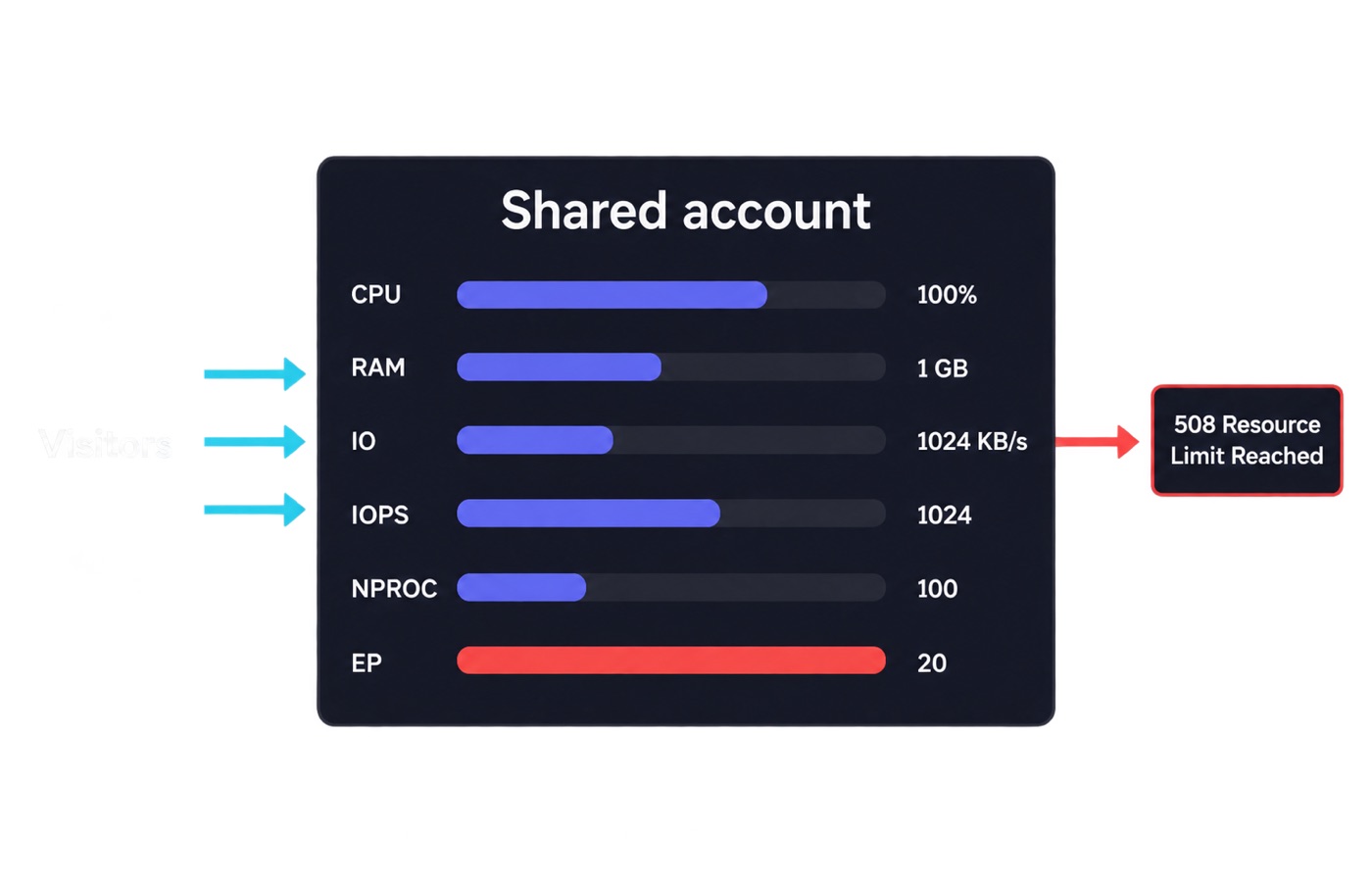
CloudLinux publishes the defaults it recommends for two tiers of shared account. These are vendor defaults, not guarantees. Your host can set them higher or lower, and the better ones publish their exact numbers in a knowledge-base article. Ask support for yours in writing before you decide anything.
| Limit | Typical account | High-end account | What you see at the ceiling |
|---|---|---|---|
| CPU speed (SPEED). | 100% of one core | 200% of one core | Pages simply get slower, no error. |
| Physical memory (PMEM). | 1 GB | 2 GB | 500 or 503 errors. |
| Disk throughput (IO). | 1,024 KB/s | 4,096 KB/s | Slow queries, stalled uploads. |
| Disk operations (IOPS). | 1,024 per second | 1,024 per second | Slow queries, stalled uploads. |
| Processes (NPROC). | 100 | 150 | 500 or 503 errors. |
| Entry processes (EP). | 20 | 40 | 508 “Resource Limit Reached”. |
Defaults as published in CloudLinux’s LVE limits documentation, read September 2026. Note the shape of the table. The memory and process limits produce loud failures, while the CPU and I/O limits produce quiet ones. A site can spend months hitting the CPU ceiling with nothing in the logs except a creeping response time.
What breaks first, and in what order
Entry processes almost always go first. CloudLinux counts every live connection to a dynamic script. In practice that covers PHP requests, SSH sessions and cron jobs running at the same moment. Once the limit is reached, the web server cannot place the request into your container, so it returns a 508. The failure is visible to visitors and invisible in most uptime monitors. The monitor usually requests a cached page that never touches PHP.
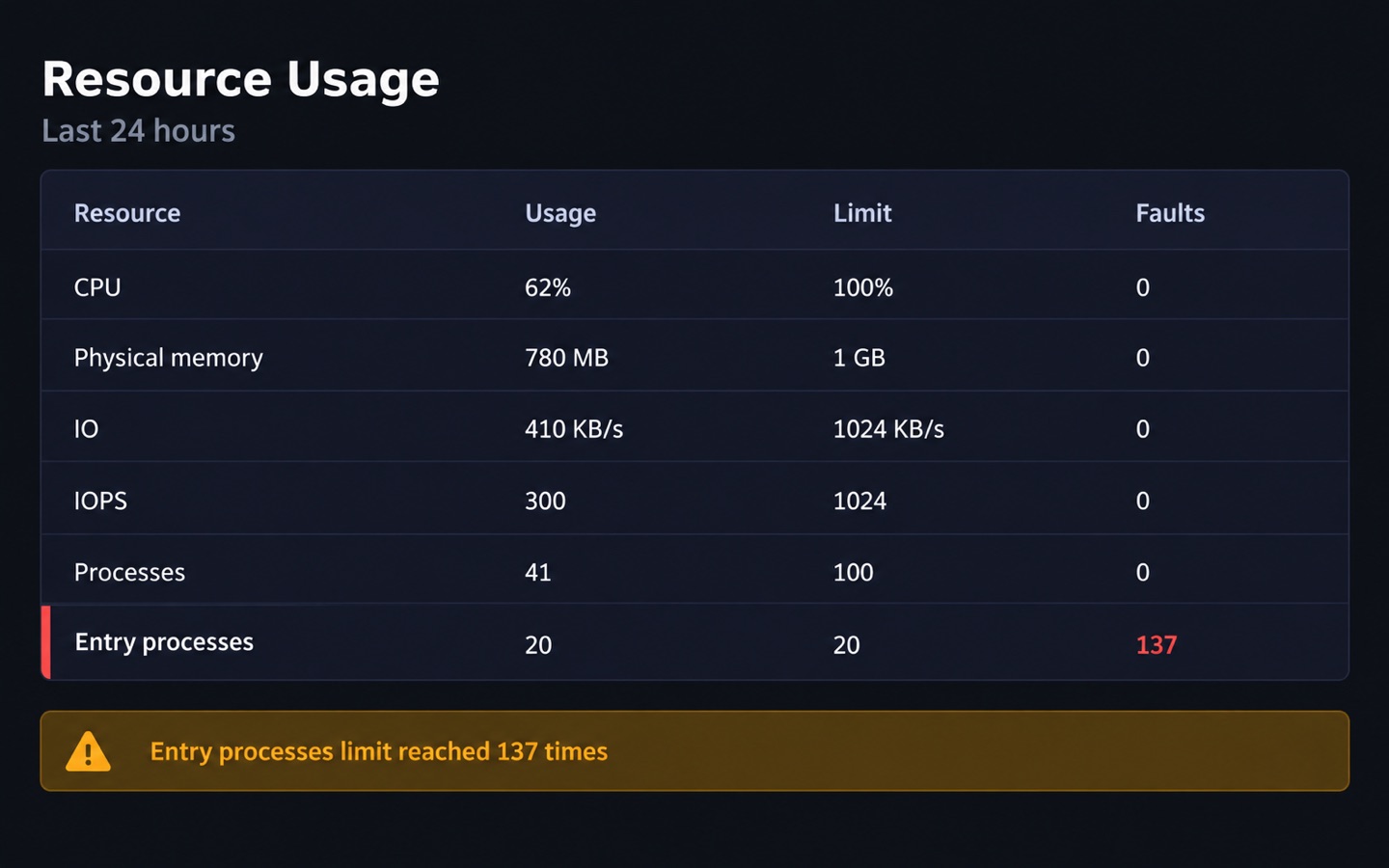
Memory goes second, and it goes at the worst time. A WordPress import, an image regeneration run or a bloated plugin can push a single PHP worker past the 1 GB memory ceiling. The request then dies with a 500 or 503 rather than a friendly message. Disk throughput is third. At 1,024 KB/s, a database that no longer fits in cache turns every uncached query into a queue.
Inodes are the sleeper. An inode is one file-system record, so one file or folder uses one inode. Inode limits are enforced as a disk quota on the home partition. There is a soft limit you may exceed for a grace period, seven days by default, and a hard limit that stops writes outright.
This is why “unlimited storage” is never unlimited files. WebHostingPad, for example, markets uncapped disk on its Power Plan. Its terms of service still cap the account at 200,000 inodes. A mail folder with 80,000 messages and a cache directory with 60,000 files can exhaust that before the disk is half used. Our guide on how much disk space and bandwidth you need covers the arithmetic side of the same problem.
Five thresholds that say it is time to move
None of these is a marketing number. Each one is something you can read off a log file, a panel screen or a field measurement this afternoon. Check them in order, because the cheapest fix is usually higher up the list than the upgrade is.
- 508 errors more than once a week. One per quarter during a launch is normal. Weekly means your traffic shape no longer fits 20 entry processes.
- Peak memory above 70% of the PMEM ceiling. At 1 GB that is 700 MB. The rest of the headroom disappears the first time two heavy requests overlap.
- TTFB above 1.8 seconds at the 75th percentile. Measure it on a page that bypasses the cache, and from your audience’s region rather than your desk.
- Inode usage above 80% of the cap. At a 200,000-inode cap that is 160,000 files, and deleting old backups only buys one round.
- A capability you cannot buy. Root, a queue worker, Redis, a custom cron cadence, a second IP, or a framework that expects a long-running process.
The first three can often be answered without spending anything. A page cache converts most dynamic requests into static files, which takes them out of the entry-process count entirely. An object cache cuts the database round trips that pin your I/O. If a cache plugin drops your 508 rate to zero, you did not have a hosting problem.
What the upgrade really costs in our catalog
The shared-versus-VPS price gap is much smaller than the marketing suggests. At renewal it sometimes runs the other way. The table below pairs the entry shared plan with the entry VPS at the same provider. It uses the intro rate and the published renewal rate for the term shown. All figures are as of September 2026 and match the plan data on each provider’s review page.
| Provider | Entry shared | Entry VPS | VPS specs | Gap at renewal |
|---|---|---|---|---|
| Bluehost | $3.99/mo intro, $9.99/mo renewal (36-mo term). | $2.09/mo intro, $4.68/mo renewal (24-mo term) | 1 vCPU, 2 GB RAM, 50 GB NVMe | VPS is $5.31/mo cheaper. |
| Hostinger | $2.99/mo intro, $10.99/mo renewal (48-mo term). | $6.49/mo intro, $11.99/mo renewal (24-mo term) | 1 vCPU, 4 GB RAM, 50 GB NVMe, 4 TB transfer | VPS is $1.00/mo more. |
| HostPapa | $2.95/mo intro, $8.99/mo renewal (36-mo term). | $5.95/mo intro, $9.99/mo renewal (36-mo term) | 2 vCPU, 2 GB RAM, 50 GB NVMe | VPS is $1.00/mo more. |
| InMotion Hosting | $4.79/mo intro, $14.99/mo renewal (12-mo term). | $9.99/mo intro, $16.99/mo renewal (36-mo term) | 4 vCPU, 8 GB RAM, 160 GB NVMe | VPS is $2.00/mo more. |
| Vultr | No shared hosting. | $5.00/mo flat, or $0.007/hr | 1 vCPU, 1 GB RAM, 25 GB SSD | No renewal step at all. |
Prices as of September 2026, checked Sep 17, 2026. Two things fall out of that table. First, the intro rate is the wrong number to compare. Shared plans discount harder at signup and rebound harder at renewal, and those mechanics are worth understanding before you sign anything.
Second, the Bluehost row is not a typo. Its self-managed VPS renews at less than half the price of its entry shared plan. The VPS is unmanaged, while the shared plan carries support costs. You can browse the same tier across providers on our cheap VPS plans under $10 page, and size the instance with the VPS calculator.
Here is the honest caveat. A $4.68/mo VPS with 2 GB of RAM is not automatically faster than a shared account with a 1 GB memory ceiling and 100% of a modern core. You are buying isolation and control, not horsepower. Horsepower starts costing real money around the 4 vCPU / 8 GB tier. Above that, the comparison is with dedicated servers rather than shared hosting.
What the migration actually takes
An unmanaged VPS hands you an empty operating system. You install the web server, PHP, the database and the mail path, then keep patching them. Nobody does it for you at 3 a.m. For a WordPress site, the project’s own requirements page sets the target stack. It asks for PHP 8.3 or greater, MySQL 8.0 or MariaDB 10.11 or greater, and HTTPS support. Budget a weekend for a first migration and an evening for the fifth.
The sequence that avoids downtime is boring, and it works. Start with the DNS TTL, the number of seconds other servers may cache your DNS records. Lower it to 300 seconds at least a day before the move, so the cutover propagates in minutes instead of hours. Build the new server, copy the files and the database, then test the site on the new IP through a hosts-file entry. Only then switch the records. Keep the old account paid until the new one has survived a full traffic week.
Two details catch people out. Email is the first. A shared account includes mailboxes and a bare VPS does not, and outbound port 25 is usually blocked on new instances. Plan on a mail service rather than a local mail server.
Latency is the second. Check the round-trip time from your audience to the candidate data center with our ping test before you commit. A cheaper instance three thousand miles away can cost more milliseconds than the upgrade saves. Hourly billing makes the whole rehearsal cheap. At $0.007/hr an instance costs about $0.17 for a full day of testing, and the hourly-billed VPS plans page lists providers that bill that way.
When you should not upgrade
Most sites that ask this question do not need a VPS. Say your pages are cached, your 508 rate is zero and your TTFB is under 0.8 seconds. Then an upgrade converts a working setup into a server you now have to administer. Buying a VPS to fix a slow site is the classic mistake. A plugin doing 400 database queries per page will do 400 queries on any server. On 1 vCPU it may well do them slower than on shared hardware with a faster core.
Skip the upgrade when the real problem is storage or transfer. A higher shared tier is far cheaper per gigabyte than a VPS with the same disk. Skip it when nobody on your team can run apt upgrade and read a log file, or budget for managed hosting instead. The one fully managed VPS in our catalog is priced at $84.95/mo as of September 2026. That is a different conversation from $4.68.
And skip it for a brochure site that a local business runs on 40 visits a day. A shared plan covers that case better than a server does.
One exception is worth naming: compliance and isolation. If you process card data or hold client records, the argument for a private instance stands even at low traffic. You control the patch level, and nobody shares your file system.
Common mistakes
These come up constantly in hosting forums, and four of the five cost money rather than uptime.
- Buying a VPS smaller than the shared account. A 512 MB or 1 GB instance can be a straight downgrade from a shared plan with a 1 GB memory ceiling and burst CPU.
- Comparing intro prices. The $2.09/mo VPS and the $3.99/mo shared plan renew at $4.68 and $9.99. The ranking flips at month 25.
- Migrating with a 24-hour DNS TTL still set. You get a day of split traffic, with orders landing on a server you are about to delete.
- Forgetting mail. Moving the website and leaving the MX records pointed at a cancelled shared account is the most common way to lose a day of customer email.
- Treating “unlimited” as unlimited. Inode caps such as the 200,000-file limit in WebHostingPad’s terms apply regardless of how much disk is advertised.
We check every price in this article against the provider’s own pricing pages and record the date. The method is described in our editorial policy.
FAQ
How much traffic can shared hosting handle? There is no honest single number, because the limit is concurrency rather than monthly volume. With the default 20 entry processes and an uncached page that spends 400 ms in PHP, the ceiling works out around 50 dynamic requests per second. Add full-page caching and the same account can serve many times that, because cached hits never enter the count.
Is a VPS faster than shared hosting? Not automatically. A VPS gives you dedicated RAM and a predictable CPU allocation, which removes the noisy neighbor problem. Even so, an entry instance with 1 vCPU can be slower than a shared account that was allowed 100% of a newer core. The gain you can count on is consistency, not peak speed.
Do I need a managed VPS? If nobody on the project can patch a server, apply security updates and restore a backup under pressure, then yes. Price it honestly: the managed plan we track is $84.95/mo as of September 2026, against $4.68 for self-managed. Many teams land in the middle by staying on shared hosting and spending the difference on caching and a CDN.
Will my site go down during the migration? It should not. Lower the DNS TTL to 300 seconds a day ahead. Test on the new IP through a hosts file. Switch the records during your quietest hour, and leave the old account running for a week. The visible risk is not downtime but split writes, with orders or comments landing on the old server after the switch.
Can I go back if the VPS does not work out? Usually, and the refund windows differ enough to matter. Of the nine providers we track, two publish a 90-day money-back guarantee and six publish 30 days. One publishes none but bills hourly, so an experiment there costs cents rather than a term.
Bottom line
Upgrade when a measurable ceiling is in your way. That means repeated 508s, memory failures, an inode count near the cap, a TTFB past 1.8 seconds, or a feature the control panel cannot provide. Do not upgrade because a comparison chart says a VPS is “more professional”.
When the trigger is real, the money is smaller than expected. At renewal, an entry VPS sits within a dollar or two of an entry shared plan at most providers we track, and cheaper at one of them. Start from our VPS hosting comparison and shortlist on specs rather than on the headline price.
Sources
- docs.cloudlinux.com/cloudlinuxos/limits
- docs.cpanel.net/cpanel/metrics/cpu-and-concurrent-connection-usage
- web.dev/articles/ttfb
- wordpress.org/about/requirements
Written and fact-checked by the WebHostingBreak Editorial Team in line with our editorial policy. Prices quoted here come from the provider reviews we maintain and carry the date they were last checked. Spotted an error? Tell us.