
An unmanaged VPS gives you a bare Linux box and the root password. Root access means you can change anything on the server, including the parts that break it. A managed VPS gives you the same box plus a support team. That team patches it, watches it, and answers the phone when it stops responding. The hardware is usually identical. What you pay for is who carries the pager. This page splits that work task by task, so you can price your own time before you pick a plan.
Short answer: what you are actually buying
Unmanaged means the provider guarantees three things: the virtual machine, the network and the hypervisor. The hypervisor is the software on the physical host that runs your virtual machine. Everything above the operating system image is yours. That covers package updates, kernel reboots, firewall rules, backups and TLS certificates. It also covers web server settings, database tuning and the 3 a.m. phone call.
Managed means the provider takes a defined slice of that list. The slice is usually OS patching, firewall, backups, monitoring and a control panel. A control panel is a web interface, such as cPanel, that replaces most command-line work. The host also answers support tickets about the server itself.
The price gap on the plans we track is large. As of September 2026, HostPapa sells an unmanaged VPS with 2 cores, 2 GB RAM and 50 GB NVMe at $5.95/mo on a 36-month term. Its managed VPS line with cPanel/WHM and two IP addresses starts at $36.95/mo. At WebHostingPad, VPS Platinum (4 GB RAM, 200 GB disk) is $44.95/mo on a 6-month term. The fully managed plan (8 GB RAM, 300 GB disk) is $84.95/mo.
So the real question is not “which is better”. It is this: are 5 to 10 hours of your month worth $30 to $50?
Who does what: the task-by-task table
Every provider words its managed tier a little differently, so read the plan page before you buy. The split below is the common shape across the plans in our hosting directory. It also shows the time you should budget on the unmanaged side.
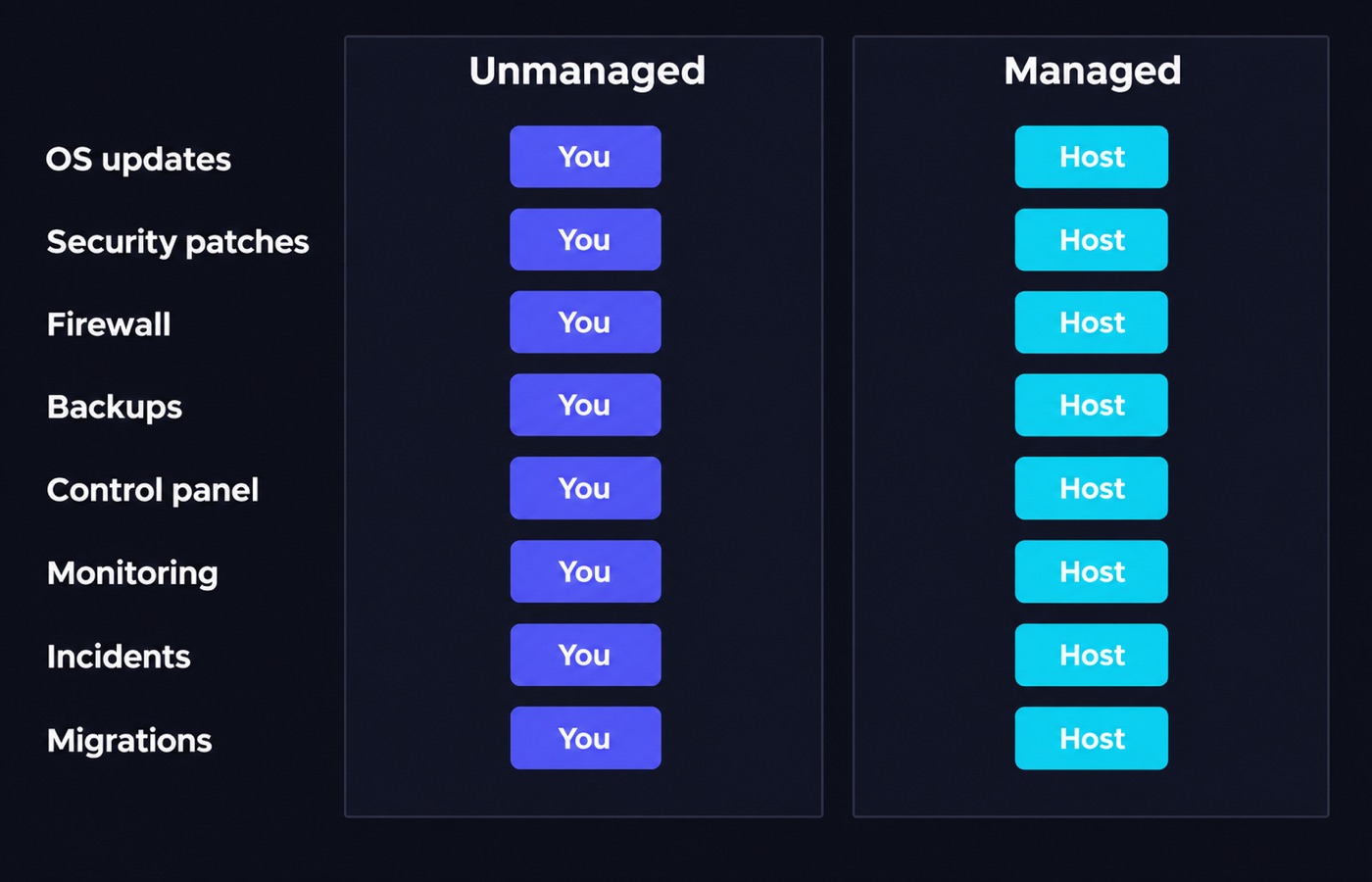
The hour figures are planning estimates for a single small-to-medium site. They are not measurements from a test lab. Use them to build a budget, then track your own numbers for two months and correct them.
| Task | Unmanaged | Managed | Time to budget (unmanaged) | Skill needed |
|---|---|---|---|---|
| OS package updates | You run the package manager and schedule reboots. | The host patches on its own cadence. | 1-2 h/mo | Shell, apt or dnf. |
| Security patches (urgent CVEs) | You watch security advisories and patch within days. | The host applies them, often the same week. | 1-3 h/mo | Reading vendor advisories. |
| Firewall and SSH hardening | You set up nftables or ufw and turn off password login. | Firewall is set up for you, sometimes with a WAF. | 2-4 h once, then 0.5 h/mo | Networking basics. |
| Backups | You set them up, store them off-server and test restores. | Usually scheduled and kept for you. | 2-3 h once, then 1 h/mo | Storage, cron, restore drills. |
| Control panel | You install and license it, or go without one. | cPanel, Plesk or CWP included. | 2-4 h once | Linux administration. |
| Monitoring and alerts | You install agents and set the thresholds. | The host watches and opens a ticket. | 2-3 h once, then 0.5 h/mo | Ops tooling. |
| Incident response | You, at whatever hour it breaks. | 24/7 team, with a response time in the SLA. | Unpredictable | Log reading, debugging. |
| Migrations and stack upgrades | You plan and run every move. | Migration help is often included. | 3-8 h per move | Full stack. |
Data checked Sep 17, 2026. Three terms in that table are worth spelling out. A CVE is a numbered public security flaw. A WAF, or web application firewall, filters bad requests before they reach your site. An SLA is the service level agreement, the contract line that sets how fast support has to answer. Support scope is set by each provider’s terms, and it can change.
What unmanaged really costs you in hours
The first month is the expensive one. You have to set up the server, harden SSH, and install a web server, PHP-FPM and MySQL. Then you wire up TLS, the encryption behind the padlock, and get backups off the box. That is a solid 10 to 20 hours if you have done it before, and a lot more if you have not. The work is one-time, but it is real. It is also the part people forget when they compare a $5.95/mo plan with a $36.95/mo plan.
After that, the steady state is smaller, but it is never zero. You patch, check that backups restored, read logs after a traffic spike, and renew anything the automation missed. On a single active site that adds up to roughly 5 to 10 hours per month. The number grows with each site you add. It does not grow in a straight line, but it does not grow slowly either.
Reddit’s r/webhosting has a July 2026 thread called “At what point does managed hosting become worth paying for instead of managing your own VPS?”. One agency owner there described running a reseller VPS for over ten years, with 120 client sites, before switching to managed. He switched because an outsourced server admin would have cost more than doubling the hosting bill. That is the honest decision point. It is a labor cost question, not a technology question.
The skills an unmanaged box assumes you have
Provider marketing says “full root access” as if it were only a benefit. Root also means nothing stops you from breaking the machine. Before you choose unmanaged, check that you are comfortable with seven things. SSH key authentication and sudo. Systemd units and journal logs. Nginx or Apache virtual hosts. MySQL or MariaDB users and dumps. TLS certificates, both issuing and renewing them. Cron, the scheduler that runs jobs at set times. And basic DNS record editing.
If four of those seven are unfamiliar, the cheap plan is not cheap. You will spend the difference on tutorials, and you will learn DNS at the worst possible moment. There is a middle path. Start on shared web hosting or a managed VPS. Move to unmanaged once you have run the whole stack in a sandbox.
The real price difference in our catalog
These are prices from the plans we track, checked Sep 17, 2026. Introductory rates require the full term paid upfront. Renewal is what you pay from year two or three onward.
| Plan | Model | Specs | Intro | Renewal |
|---|---|---|---|---|
| Bluehost Self-Managed VPS NVMe 4 | Unmanaged | 2 vCPU, 4 GB RAM, 100 GB NVMe. | $4.18/mo (24 mo) | $9.35/mo |
| Bluehost cPanel add-on | Add-on | License only. | from $14.99/mo | – |
| Hostinger KVM 2 | Self-managed | 2 vCPU, 8 GB RAM, 100 GB NVMe. | $8.79/mo (24 mo) | $14.99/mo |
| HostPapa Unmanaged VPS Start | Unmanaged | 2 cores, 2 GB RAM, 50 GB NVMe. | $5.95/mo (36 mo) | $9.99/mo |
| HostPapa Managed VPS (entry) | Managed, cPanel/WHM, 2 IPs | Published from-price. | from $36.95/mo | – |
| InMotion Hosting VPS 4 vCPU | Managed | 4 vCPU, 8 GB RAM, 160 GB NVMe. | $9.99/mo (36 mo) | $16.99/mo |
| WebHostingPad VPS Platinum | Self-managed, root + cPanel | 4 GB RAM, 200 GB disk. | $44.95/mo (6 mo) | – |
| WebHostingPad VPS Managed | Managed | 8 GB RAM, 300 GB disk. | $84.95/mo (6 mo) | – |
| Vultr Cloud Compute 2 vCPU | Unmanaged, hourly | 2 vCPU, 4 GB RAM, 80 GB NVMe. | $20/mo | same |
Two things stand out. First, the managed premium is not a fixed percentage. HostPapa charges roughly $31/mo more for managed than for a comparable unmanaged plan, which is $372 per year. InMotion Hosting, meanwhile, sells a managed 4 vCPU box at $16.99/mo on renewal. That is cheaper than several unmanaged plans once you add a panel license. Second, renewals move more than intro prices do, so compare renewal to renewal.
Prices are set by the providers and change often. Each figure above matches the price and check date on our provider review pages. How we collect and re-check them is described in our editorial policy.
Control panels are the hidden line item
A control panel is the single biggest reason an unmanaged plan stops being cheap. Bluehost’s VPS line is explicitly self-managed, and cPanel is sold separately, starting at $14.99/mo. Add that to the $9.35/mo renewal on the NVMe 4 plan and the real cost is $24.34/mo. That lands above InMotion Hosting’s managed VPS renewal of $16.99/mo, for a bigger machine.
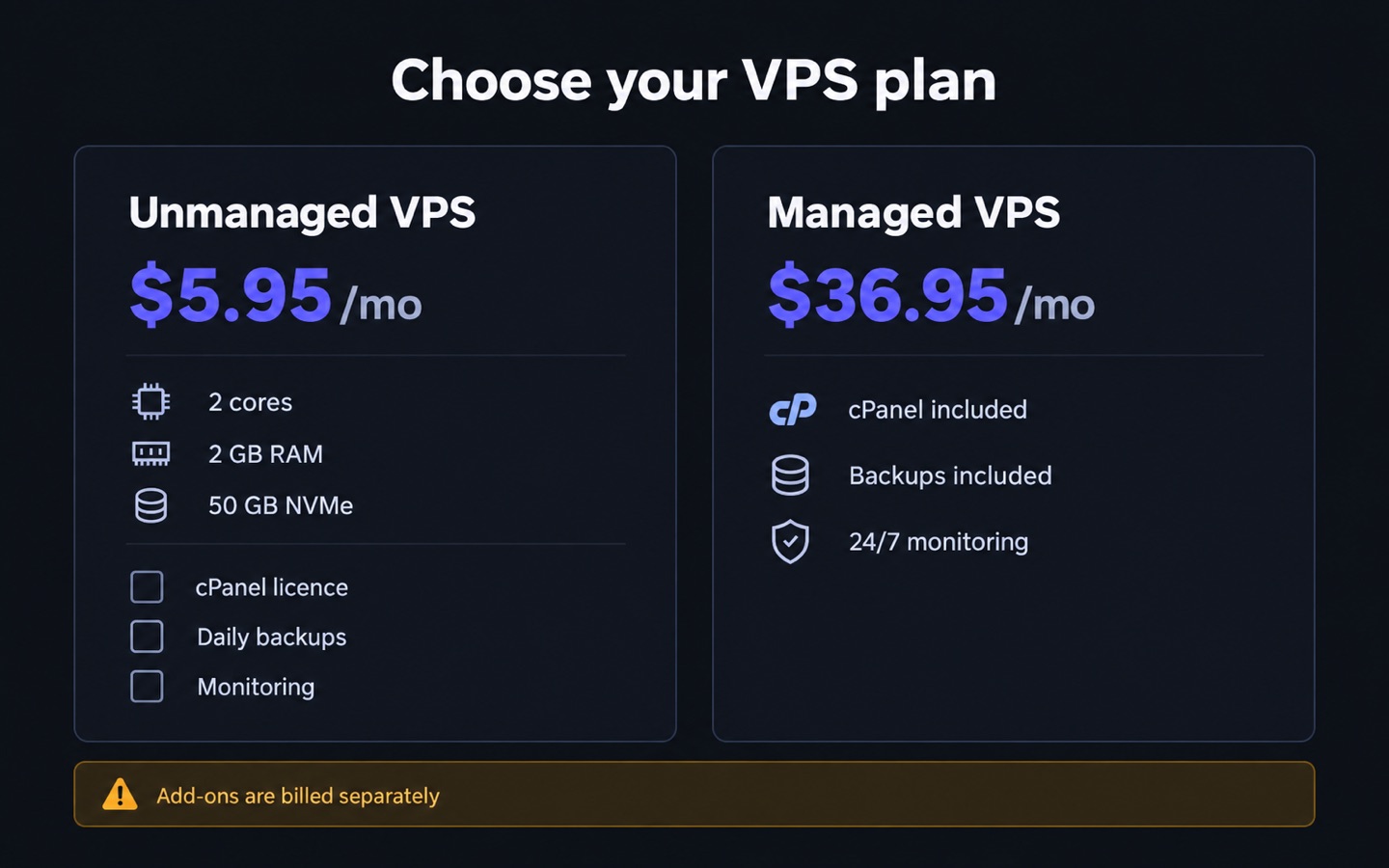
HostPapa’s unmanaged plans do not include cPanel, migration help or backups at all. Acronis backup, CloudLinux and Imunify360 are listed as paid add-ons. That is a fair way to sell it. It does mean the sticker price is a floor, not a total.
You can of course skip the panel. Command-line management with a deploy script is faster and free, and plenty of developers work that way. Just count it as a skill requirement, not as a saving.
What “managed” does not cover
Managed hosting covers the server, not your application. Say your WordPress site throws a fatal error after a plugin update. Most managed VPS teams will confirm that PHP is running and hand the ticket back to you. Read the support scope carefully for four things. Is application-level debugging included? Are backups taken, and how long are they kept? What is the response time commitment? And does the host reboot for kernel updates on its own, or wait for your approval?
The kernel is the core of Linux, and an update to it needs a reboot to take effect.
Also note that “managed” does not mean “untouchable”. Access you grant to a support team is access that can be used badly. Keep your own off-server backup even on a managed plan.
On the unmanaged side, the provider still handles the things you cannot. That means hypervisor health, network capacity and DDoS filtering at the edge. Hostinger, for instance, lists Wanguard-based DDoS filtering and free weekly backups on its self-managed KVM VPS, which softens the difference. Vultr sits at the other end. Its own materials describe it as the wrong choice if you want a host that installs WordPress, handles email and answers the phone.
Which one fits your project
Pick unmanaged if you already administer Linux. It also fits if you run more than one project on the box. The same goes if you need a specific stack, such as containers, a queue worker or a non-standard PHP build. Hourly billing is another reason, because you can destroy the instance after an experiment. Vultr bills hourly with a monthly cap and has no refund window. That suits short-lived machines, and it suits nobody who wants a safety net.
Pick managed if the site earns money. It also fits if you are the only technical person and the marketing person at the same time. The same goes if you cannot answer a pager at night. And it fits if compliance requires documented patching that you do not want to document yourself.
A 90-day money-back window is a cheap way to test a host before you commit. InMotion Hosting and Web Hosting Hub both offer one on shared plans. Most other hosts give 30 days.
Are you still on shared hosting and just running out of room? Check whether you need a VPS at all. Our guide on how much disk space and bandwidth you need sizes that honestly. And if you need guaranteed cores rather than shared ones, look at dedicated servers instead of a large VPS.
Common mistakes
The mistake that costs the most is simple. You compare an unmanaged sticker price with a managed sticker price and stop there. Add the panel license, the backup add-on, the monitoring tool and your hourly rate. The gap usually shrinks to $10-$20/mo.
The second is comparing introductory prices. A 36-month intro rate of $5.95/mo that renews at $9.99/mo is a different product from one that renews at $39.99/mo. Renewal is where you spend most of the years.
Third: assuming managed support will fix your code. It will not. Fourth: never testing a restore. A backup you have not restored is only a hypothesis. Fifth: leaving SSH on password authentication because key setup felt fiddly on day one.
Sixth: buying more RAM than you need because the tier above was “only $10 more”. Measure instead. A simple ping test against candidate locations and an uptime watch through our website down checker will tell you more than a spec sheet.
FAQ
Is an unmanaged VPS cheaper in the end? Only if your time is genuinely free, or you enjoy the work. At $5.95/mo versus $36.95/mo the sticker gap is about $372 per year. That is roughly 5 to 10 hours of a freelancer’s billable time. If the server takes more than an hour a month of your attention, the arithmetic flips.
Does a managed VPS mean the host fixes my WordPress site? Usually not. Managed scope normally ends at the operating system and the services the host installed. Plugin conflicts, theme errors and slow queries in your own code are yours. Managed WordPress hosting is a separate product. It is worth comparing on our WordPress hosting list.
Can I switch from unmanaged to managed later? Yes. Many hosts sell both tiers on the same hardware, so the move is a plan change rather than a migration. Across hosts, you are doing a normal server migration. Budget 3 to 8 hours and keep the old box running for at least 7 days.
What happens if I stop patching an unmanaged VPS? Nothing visible, for a while. Then a known flaw in a public-facing service gets scanned and exploited. WordPress currently recommends PHP 8.3 or newer, and MySQL 8.0 or MariaDB 10.11. PHP 8.2 leaves security support on Dec 31, 2026. So an unpatched box drifts out of support faster than most owners expect.
Is a managed VPS slower than an unmanaged one? Not by design. The plans in our catalog use the same AMD EPYC and NVMe hardware on both tiers. Differences in real-world speed come from settings, caching and the number of neighbors on the node. They do not come from the support contract.
Do I still need my own backups on a managed plan? Yes. Keep at least one copy off the provider’s infrastructure. cPanel’s own documentation notes that a full backup created in cPanel cannot be restored from cPanel, only from WHM. That is exactly the kind of detail you do not want to discover during an incident.
Bottom line
Unmanaged is cheaper in dollars and more expensive in hours. Managed is the opposite. On some hosts, once you add a control panel license, it is not even more expensive in dollars. Decide by writing down the eight tasks in the table above. Mark who does each one, and put a number next to the hours. Then compare VPS plans with that number in hand, rather than sorting by price.
Sources
- wordpress.org/about/requirements
- php.net/supported-versions.php
- docs.cpanel.net/cpanel/files/backup-wizard
- developer.wordpress.org/advanced-administration/security/backup
- reddit.com/r/webhosting/comments/1uqiuro/at_what_point_does_managed_hosting_become_worth
Written and fact-checked by the WebHostingBreak Editorial Team in line with our editorial policy. Prices quoted here come from the provider reviews we maintain and carry the date they were last checked. Spotted an error? Tell us.