
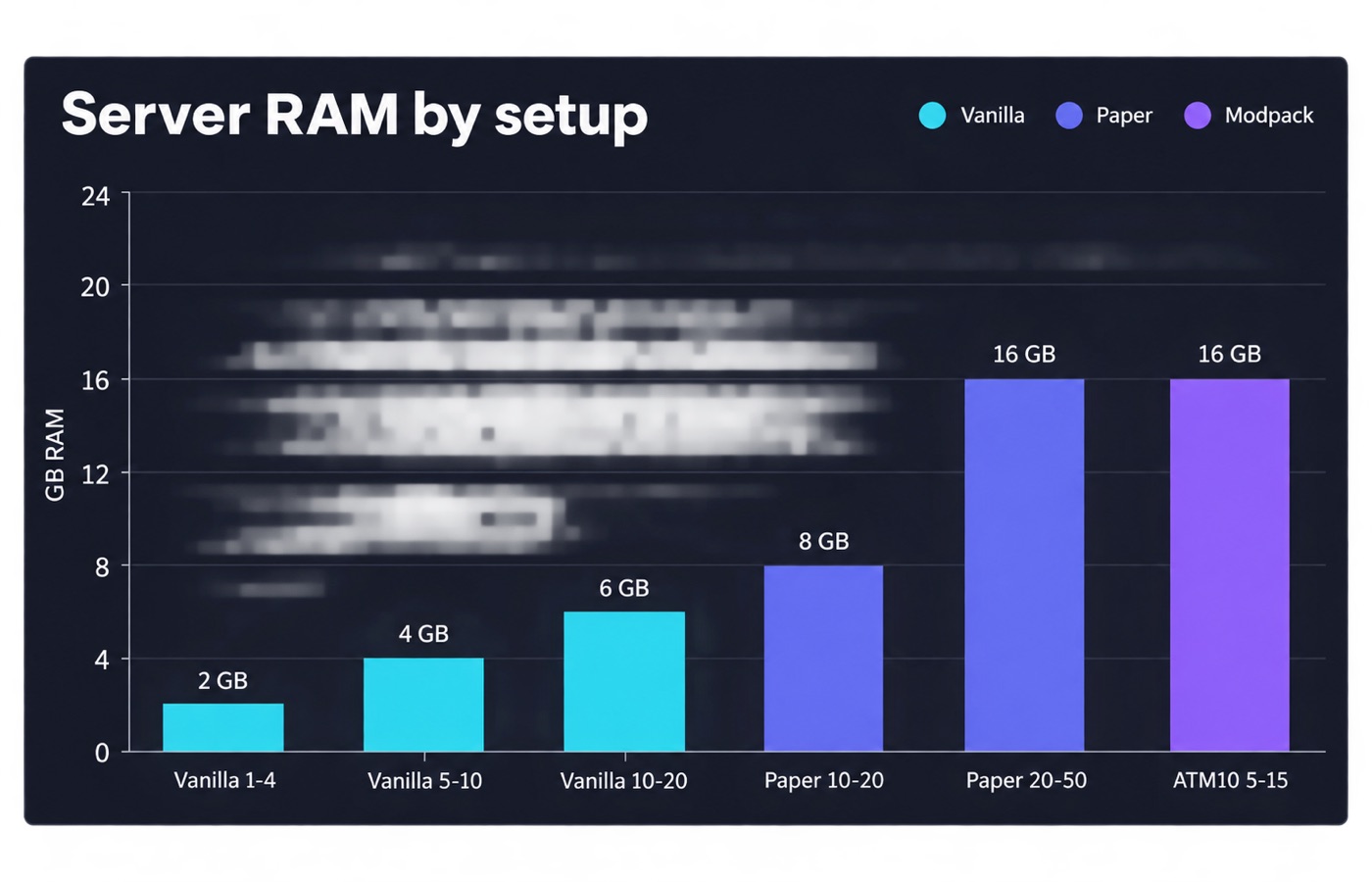
A plain vanilla Minecraft server for four friends is happy with 2 GB of RAM. A 500-mod pack such as All the Mods 10 wants 10 to 16 GB before a single player logs in. Everything between those two poles comes down to three things. The first is how many players are online at once. The second is which server software you run. The third is how far the world loads around each player.
Below is a sizing table, the JVM flags that belong with it, and the VPS plans that match each tier.
Short answer: RAM by server type and player count
Minecraft.wiki puts the floor at 1 GB for the server process. It also notes that a player object costs roughly 50 to 100 MB. In practice the server has to reserve much more than that per player.
PaperMC recommends at least 6 to 10 GB for a plugin server, no matter how few players you have. The reason is the G1 garbage collector, the part of Java that frees memory nobody is using any more. It behaves better when it has room to work.
The table below merges those published figures with the official modpack requirements. The heap is the block of memory Java sets aside for the server program itself. The “heap” column is what you pass to -Xmx. The “server RAM” column is what the machine itself needs. The JVM (the Java Virtual Machine that runs the server), the operating system and the file cache all live outside the heap.
| Setup | Players | Heap (-Xmx) | Server RAM | Basis |
|---|---|---|---|---|
| Vanilla Java, default settings. | 1-4 | 1-2 GB | 2 GB | Minecraft.wiki minimum. |
| Vanilla Java. | 5-10 | 2-3 GB | 4 GB | Minecraft.wiki recommended. |
| Vanilla Java. | 10-20 | 4 GB | 6 GB | Minecraft.wiki “best”. |
| Paper or Purpur, 10-20 plugins. | 10-20 | 4-6 GB | 8 GB | PaperMC guidance. |
| Paper or Purpur, 30+ plugins, minigames. | 20-50 | 6-10 GB | 12-16 GB | PaperMC guidance. |
| RLCraft (Minecraft 1.12.2, Forge). | 2-6 | 4-6 GB | 8 GB | Pack author recommends 3-4 GB minimum. |
| All the Mods 10 (~500 mods, NeoForge 1.21.1). | 2-5 | 10 GB | 12 GB | Official ATM10 requirements. |
| All the Mods 10. | 5-15 | 12-14 GB | 16 GB | Official ATM10 requirements. |
| All the Mods 10. | 15+ | 16 GB and up | 24-32 GB | Official ATM10 requirements. |
| Bedrock Dedicated Server. | 1-10 | no JVM heap | 2 GB | Native binary, not Java. |
Read the table as a starting point, not a verdict. Take a 10-player survival world that has been running for two years, with three nether highways and a mob farm. It can easily double the RAM of a fresh world with the same player count.
What actually consumes RAM on a Minecraft server
Player count is the number everyone searches for, but it is an indirect driver. What the server really pays for is loaded chunks, the entities inside them, and the block entities those entities touch. A chunk is a 16 by 16 block column of the world. Players are simply the thing that drags chunks into memory.
Each online player keeps a square of chunks loaded around themselves. With the default view-distance=10 that is a radius of 10 chunks, so 21 x 21 = 441 chunks per player. Ten players standing in one town share almost all of those chunks. Ten players scattered across a 10,000-block map load close to 4,410 distinct chunks. The difference in memory can be several gigabytes.
Entities are the second bill. Mob farms, item frames, armor stands, dropped items and minecart networks are all ticked, and all held in the heap. One badly built iron farm with hundreds of villagers can cost more memory and tick time than every human on the server combined.
The third factor is churn rather than steady size. PaperMC documents a memory allocation rate reaching at least 800 MB per second on a 30-player server. Most of that is short-lived block-position objects that the server creates and drops again at once. That is why garbage-collector tuning matters as much as raw capacity.
View distance and simulation distance move the needle most
Two settings in server.properties control how much world the server holds. Both accept values from 3 to 32 chunks, and both default to 10. They do different jobs.
view-distance is how much world data the server sends to clients. Lowering it from 10 to 8 drops the per-player chunk square from 441 to 289 chunks, a 34 percent cut. Dropping to 6 leaves 169 chunks, a 62 percent cut. Players notice the shorter horizon. In exchange, the server stops paying for terrain nobody is using.
simulation-distance is the radius in which living entities are ticked at all. Outside it, mobs are neither updated nor visible. Setting simulation-distance lower than view-distance is the standard trick. Players still see far, but the server only simulates what is close.
view-distance=8
simulation-distance=6
max-players=20
entity-broadcast-range-percentage=75
entity-broadcast-range-percentage accepts 10 to 1000 and defaults to 100. At 75 the server sends entity updates at three quarters of the usual distance. That cuts bandwidth and client-side load on crowded spawn areas.
Vanilla, Paper and Purpur: what each tier really needs
Vanilla Java Edition is the most memory-hungry option per player. It has none of the chunk and entity optimizations the forks ship. It is also the only option if you want strict parity with singleplayer behavior.
Paper is a fork of Spigot that rewrites large parts of chunk loading and entity ticking. On the same hardware it usually holds a higher tick rate than vanilla at the same player count. The tick rate is how many world updates the server finishes per second, and 20 is the target. That is why nearly every public survival server runs Paper. Purpur is a fork of Paper that adds more configuration knobs on top, and its memory profile is close to Paper’s.
The forks do not reduce the RAM you should buy. They change what you get for it. On the same heap, a Paper server generally holds a usable tick rate at a higher player count than vanilla does. Neither project publishes a player-per-gigabyte figure. Plugins then eat into that: a permissions plugin is free, a dynamic map renderer or a world-edit suite is not.
Java version is not optional. Minecraft 1.17 raised the requirement to Java 16, 1.18 to Java 17, and 1.20.5 to Java 21. Running an old JRE is the most common cause of a server that will not start at all.
Modpacks: ATM10, RLCraft and the 500-mod problem
A modpack is a bundle of mods that someone has put together and tested as a set. Modpacks change the arithmetic completely, because the mods themselves occupy heap before any world is generated.
The official All the Mods 10 requirements page lists 10 GB of server RAM for 2 to 5 players. It lists 12 to 14 GB for 5 to 15 players, and 16 GB or more above that. Those figures assume Java 21 with NeoForge for Minecraft 1.21.1. The page also calls for NVMe storage: 30 GB for a small server, 100 GB or more for a large one.
RLCraft sits at the other end. It still runs on Minecraft 1.12.2 with Forge, and the pack author’s recommendation is 3 to 4 GB minimum. Because it is an old 1.12.2 pack, over-allocating actively hurts. The garbage collector has to walk a large heap that is mostly empty, and you get stutter instead of smooth play.
One rule holds across packs. Mod count predicts the baseline RAM, and player count predicts the growth on top of it. A 500-mod pack with three players needs more memory than a 40-plugin Paper server with thirty.
Bedrock Dedicated Server plays by different rules
Bedrock Dedicated Server is a native binary, not a Java application. There is no heap to size, no -Xmx, and no garbage collector to tune. A small Bedrock server for ten players is comfortable on 2 GB of machine RAM. The practical ceiling comes from CPU and from the add-ons you install, not from memory.
The trade-off is that Bedrock has a much smaller server-plugin ecosystem. Add-on behavior also differs from Java plugins. If your group plays on consoles and phones, Bedrock is the only realistic option, and your hosting bill will be lower. If you want Paper plugins, you are on Java.
CPU single-thread speed beats extra RAM
Minecraft’s world tick is largely single-threaded. Minecraft.wiki notes that since 1.14 the server uses extra cores for side work. Even so, no more than three cores are usually busy, and hyper-threading brings little benefit. A server tick has a 50 ms budget, which is where the 20 TPS target comes from. TPS means ticks per second. The max-tick-time setting defaults to 60000 ms, after which the watchdog force-stops the server.
That has a blunt practical consequence. If your TPS is falling, adding RAM almost never fixes it. A 4 vCPU plan on a fast modern core will out-tick a 16 vCPU plan on an old, heavily oversold node. When you compare VPS plans, look for the CPU model and for NVMe storage. Then size RAM from the table above.
Storage matters for the same reason, because chunk saves happen on the tick thread’s schedule. Loading around 500 mods from a spinning disk takes ten minutes or more. The same load takes two to three minutes from an SSD, per the ATM10 requirements page.
JVM heap flags: -Xms, -Xmx and Aikar’s flags
The simplest working start command sets the starting heap and the maximum heap, and nothing else.
java -Xms4G -Xmx4G -jar paper.jar --noguiSetting -Xms equal to -Xmx is deliberate. PaperMC’s documentation explains why. Your machine has to survive the JVM using the entire -Xmx anyway. Any gap between the two is memory you paid for and never use. G1 works better with more memory available to it, and it will not use what it does not need.
For anything above a small vanilla world, PaperMC publishes a full recommended flag set. People call it Aikar’s flags.
java -Xms10G -Xmx10G
  -XX:+UseG1GC
  -XX:+ParallelRefProcEnabled
  -XX:MaxGCPauseMillis=200
  -XX:+UnlockExperimentalVMOptions
  -XX:+DisableExplicitGC
  -XX:+AlwaysPreTouch
  -XX:G1NewSizePercent=30
  -XX:G1MaxNewSizePercent=40
  -XX:G1HeapRegionSize=8M
  -XX:G1ReservePercent=20
  -XX:G1HeapWastePercent=5
  -XX:G1MixedGCCountTarget=4
  -XX:InitiatingHeapOccupancyPercent=15
  -XX:G1MixedGCLiveThresholdPercent=90
  -XX:G1RSetUpdatingPauseTimePercent=5
  -XX:SurvivorRatio=32
  -XX:+PerfDisableSharedMem
  -XX:MaxTenuringThreshold=1
  -jar paper.jar --nogui
The important members of that set are the new-generation percentages. The young generation is the part of the heap that holds brand-new objects. Defaults give it about 5 percent of the heap. These flags raise it to 30-40 percent, so Minecraft’s very high allocation rate does not force young collections one or two times per second. The MaxTenuringThreshold=1 flag stops short-lived data from moving into the old generation, which is where long pauses come from.
Replace 10G with your own figure. The flags are a shape, not a size.
Leave headroom: 8 GB of VPS RAM is not 8 GB of heap
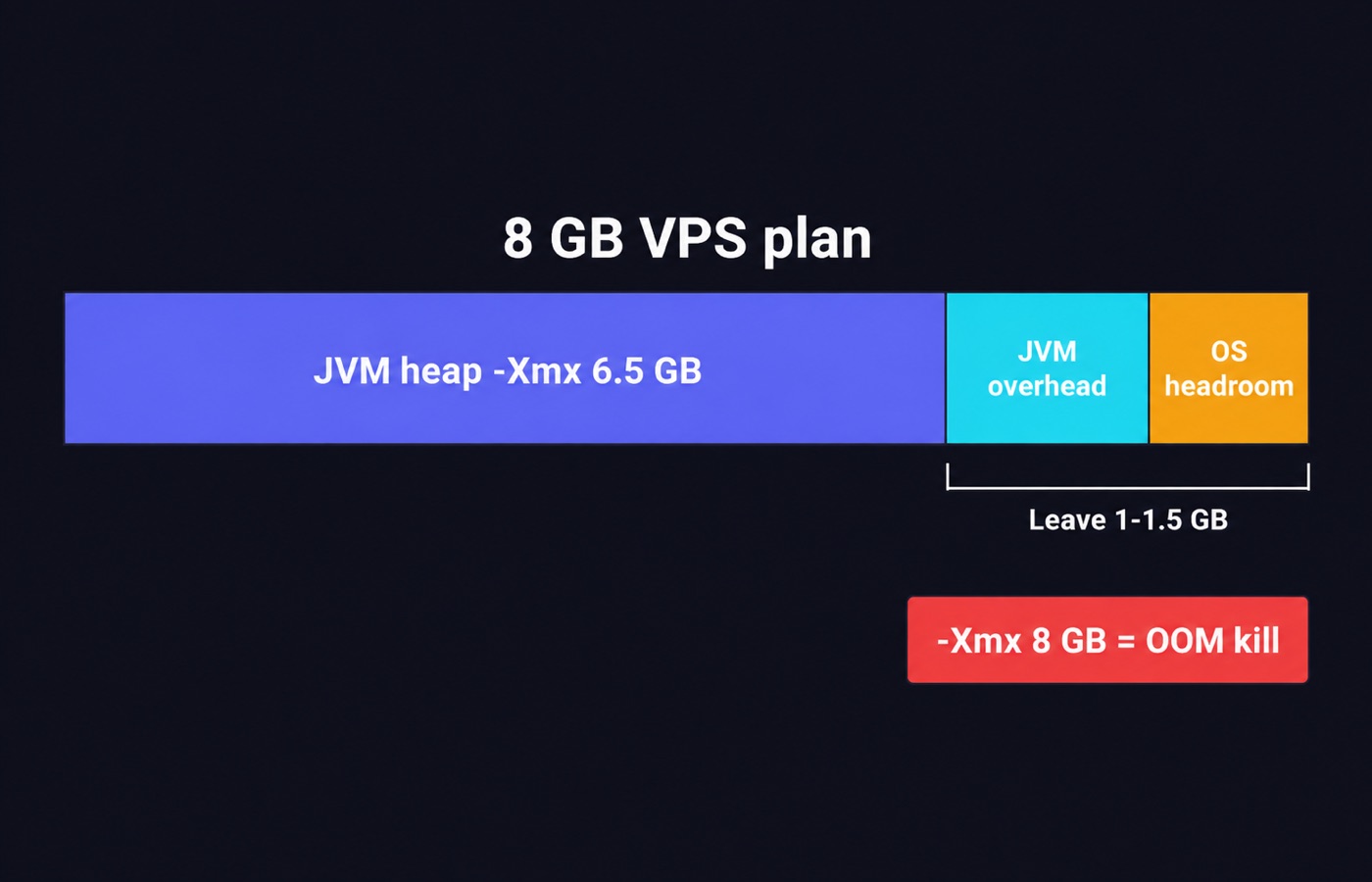
This is the mistake that kills more servers than any other. PaperMC states it plainly: if your host says you have 8 GB, do not use 8 GB. Cut -Xmx and -Xms by roughly 1000 to 1500 MB. That leaves room for the operating system and for the JVM’s own structures outside the heap. Their worked example is an 8 GB machine running a 6500 MB heap.
What happens otherwise is the Linux OOM killer. It ends the Java process without warning when the machine runs out of memory, usually during a chunk-generation burst as a player explores new terrain. There is no crash log worth reading, just a dead server. On a 16 GB plan, 14 GB of heap is the sensible ceiling. The ATM10 documentation makes the same point from the client side, and asks you to leave 2 to 4 GB free.
The corollary is that more heap is not linearly better. PaperMC warns about diminishing returns past a certain point, and calls 32 GB for a normal server a waste of money.
Pre-generate the world to cut RAM and CPU spikes
Generating new chunks is the most expensive thing a Minecraft server does. A player sprints along a new nether highway, and the server builds terrain, structures and entities on the tick thread. Memory climbs, and everyone else sees the TPS drop.
Pre-generate the playable area with a plugin such as Chunky, then set a world border. That turns a repeating spike into a one-off job you run at three in the morning. It also caps disk usage. A pre-generated 5,000-block-radius overworld is a known quantity; an open-ended one is not.
# In the server console, with the Chunky plugin installed
chunky world world
chunky radius 5000
chunky start
Pair it with /worldborder set 10000 so players cannot walk past what you generated.
How the tiers map to VPS plans we track
Two providers in our directory are flagged for game servers and carry Minecraft-capable plans. Prices below are from our catalog as of September 2026, and they match the figures on each review page.
| Tier from the sizing table | Plan | Resources | Price |
|---|---|---|---|
| Vanilla, 5-10 players. | Hostinger KVM 1 | 1 vCPU, 4 GB RAM, 50 GB NVMe | $6.49/mo on a 24-month term, renews at $11.99/mo. |
| Paper, 10-20 players. | Hostinger KVM 2 | 2 vCPU, 8 GB RAM, 100 GB NVMe | $8.79/mo on a 24-month term, renews at $14.99/mo. |
| ATM10, 5-15 players. | Hostinger KVM 4 | 4 vCPU, 16 GB RAM, 200 GB NVMe | $12.99/mo on a 24-month term, renews at $28.99/mo. |
| Large modded or network. | Hostinger KVM 8 | 8 vCPU, 32 GB RAM, 400 GB NVMe | $25.99/mo on a 24-month term, renews at $49.99/mo. |
| Paper, hourly billing. | Vultr Cloud Compute Regular | 4 vCPU, 8 GB RAM, 160 GB SSD | $40/mo, no promotional pricing. |
| Small pack, fast cores. | Vultr High Frequency | 2 vCPU, 4 GB RAM, 128 GB NVMe | $24/mo, no promotional pricing. |
Prices checked Sep 17, 2026. Hostinger’s headline rates require a 24-month prepayment. The renewal column is what you actually pay from year three. Vultr bills hourly with no introductory discount. That makes it the cheaper way to run a server that only exists during a season.
Vultr also sells DDoS mitigation as a $10/mo per-instance add-on rated at 10 Gbps. It is worth reading about on our DDoS protection page before you publish a server IP.
For location, Hostinger lists 13 data centers, including Boston and Phoenix in the United States. Vultr lists 33 regions, nine of them in the US. Browse the full set on our Minecraft hosting page, the wider game server section, or by region in US VPS and European VPS. Our full ranking method is described in the editorial policy.
Common mistakes
Allocating the whole machine to the heap. An 8 GB plan with -Xmx8G will be killed by the operating system sooner or later. Leave 1000-1500 MB.
Treating RAM as a TPS fix. Low tick rate is almost always CPU, entities or chunk generation. Check the timings report before you upgrade the plan.
Leaving view-distance at 10 for a 40-player server. That is up to 441 chunks per player. Most large public servers run 6 to 8 and nobody complains.
Copying Aikar’s flags without changing the heap size. The published example uses 10G. Pasting it onto a 4 GB plan produces an immediate failure to start.
Running an outdated JRE. Minecraft 1.20.5 and later require Java 21. This is the first thing to check when a server refuses to boot.
Never pre-generating. A server that generates chunks live will keep stuttering no matter how much memory you throw at it.
FAQ
How much RAM does a Minecraft server need per player? There is no reliable per-player constant. Minecraft.wiki puts a player object at roughly 50 to 100 MB, but notes that the server allocates much more per player in practice. Size by tier instead: 2 GB for up to four players on vanilla, 4 GB for five to ten, 6 GB and up beyond that.
Will more RAM raise my TPS? Only if you were actually running out. Once the heap is large enough to avoid constant collections, extra memory does nothing for tick rate. PaperMC warns about diminishing returns past roughly 10 GB for a normal server.
Is 4 GB enough for 10 players? For vanilla or a lightly modded Paper server with view-distance around 8, yes. For any large modpack, no: All the Mods 10 asks for 12 to 14 GB at that player count.
Do I need 32 GB for a modded server? Only for the largest packs with 15 or more players, or for a network of several worlds. PaperMC calls 32 GB for a standard server a waste of money.
Does a Bedrock server need as much RAM as a Java one? No. Bedrock Dedicated Server is a native binary with no JVM heap, and a ten-player instance runs on about 2 GB of machine memory.
Should I pick more vCPU or more RAM? Size RAM from the table, then spend what is left on single-thread speed. Minecraft uses at most about three cores, so a fast pair of cores beats a slow eight.
Bottom line
Pick your tier from the table and add 1000-1500 MB of headroom outside the heap. Set -Xms equal to -Xmx. Lower simulation-distance before you buy a bigger plan. For vanilla and small Paper groups, a 4 to 8 GB plan is the whole answer. For All the Mods 10 you are shopping at 12 to 16 GB.
Compare the current options on our Minecraft hosting page. You can also check what a given host’s network looks like from your own connection. Use the server ping tool and the ping test before you commit.
Sources
Sources
- minecraft.wiki/w/Server/Requirements
- minecraft.wiki/w/Server.properties
- docs.papermc.io/paper/aikars-flags
- all-themods.com/requirements
Written and fact-checked by the WebHostingBreak Editorial Team in line with our editorial policy. Prices quoted here come from the provider reviews we maintain and carry the date they were last checked. Spotted an error? Tell us.