
Server location is the one hosting choice you cannot undo later with a settings change. It sets a floor under how fast your site can answer. It decides which privacy law your customer records sit under. It also decides whether one regional outage takes your backups with it. This guide covers all three. It uses published round-trip figures instead of guesswork. It also shows how to test a host from your own connection before you buy a VPS plan.
Short answer: put the server where your paying users are
Here is the short version. If 80 percent of your traffic is in North America, host in North America. Pick the East Coast when most users sit in the eastern and central states. Pick the West Coast when they lean toward California and the Pacific Northwest. Pick a central city such as Dallas or Chicago when the split is genuinely even.
Microsoft’s published Azure figures put East US to Central US at about 28 ms round trip. East US to West US is about 69 ms. So a central server costs the far coast far less than a coastal server costs the other coast.
Three things override that default. A legal rule to keep records in one country beats speed every time. A site that is mostly static files can sit behind a CDN, and then the origin’s location matters much less. And a disaster-recovery plan needs a second location that will not fail at the same time as the first.
How latency scales with distance
Latency is the delay between a request and the answer. Round-trip time is that delay measured both ways: out to the server and back again. Light moves through optical fiber at roughly 200,000 km per second, about two thirds of its speed in a vacuum. That works out to about 1 ms for every 200 km in one direction. So you pay roughly 10 ms of round-trip time for every 1,000 km of fiber, before a single router touches the packet.
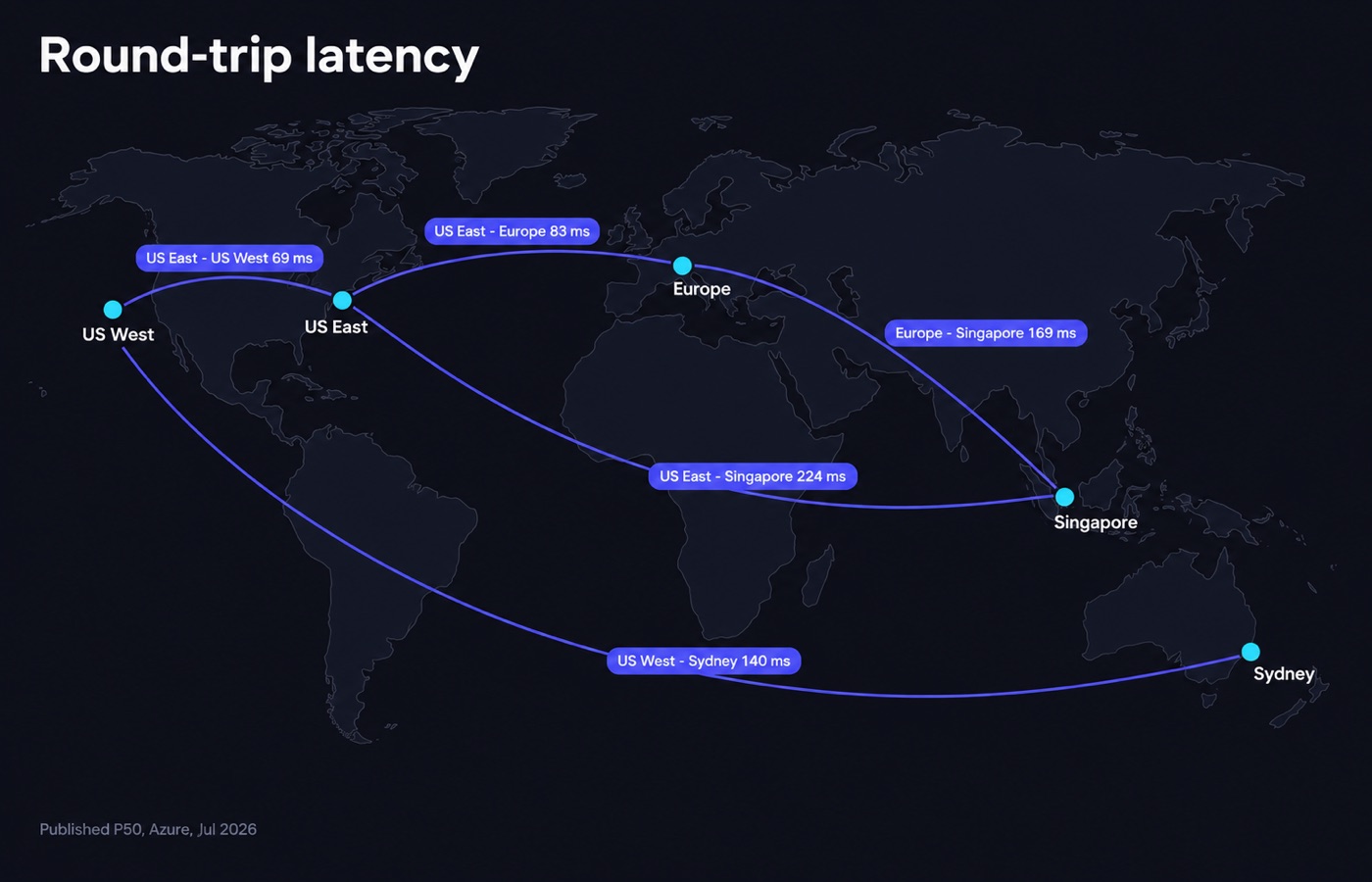
Real cable paths are longer than the map. New York to Los Angeles is about 3,940 km in a straight line. That sets a physical floor near 39 ms round trip. Yet the published Azure P50 between East US and West US is about 69 ms. P50 is the median: half the measurements were faster, half were slower.
The gap comes from routing detours, from switching, and from cable that follows railways and highways rather than straight lines. Treat the physics as a floor and the published measurements as reality.
So latency penalties come in steps, not in a smooth curve. Moving a server from Virginia to Ohio changes almost nothing. Moving it from Virginia to Frankfurt adds roughly 90 ms to every round trip. A page that makes ten requests one after another pays that penalty ten times.
Published round-trip times between regions
The table below uses Microsoft’s Azure network round-trip latency statistics. That is a public dataset of P50 measurements, collected by internal probes on the Azure backbone. The figures published at the time of writing cover the 30-day window ending July 30, 2026. They are backbone numbers between cloud regions, so treat them as a best case. A home user on a mobile connection adds their own last-mile delay on top.
| Region pair | Published P50 round trip | What it means in practice |
|---|---|---|
| East US – Canada Central | 18 ms | Effectively the same region. |
| East US – Central US | 28 ms | Unnoticeable for web traffic. |
| West Europe – UK South | 11 ms | Effectively the same region. |
| West Europe – Germany West Central | 11 ms | Effectively the same region. |
| East US – West US | 69 ms | Noticeable on multi-request pages. |
| East US – UK South | 78 ms | Transatlantic floor. |
| East US – West Europe | 83 ms | Transatlantic, typical. |
| East US – Germany West Central | 94 ms | Transatlantic, deeper into Europe. |
| West US – Japan East | 108 ms | Best trans-Pacific case. |
| East US – Brazil South | 117 ms | North to South America. |
| West US – Australia East | 140 ms | Long Pacific haul. |
| West Europe – Southeast Asia | 169 ms | Europe to Singapore. |
| East US – Southeast Asia | 224 ms | Worst common pair. |
Two readings matter. First, distance inside one continent is cheap. A gap of 11 to 28 ms sits below the point where anyone notices. Second, distance between continents is expensive, and you cannot engineer it away at the origin. A US-hosted site served to Singapore starts every connection roughly 224 ms behind.
A TLS handshake is the short exchange that sets up the padlock in the browser. It needs several of those round trips before the first byte of HTML moves.
Where a CDN helps and where it does not
A content delivery network, or CDN, keeps copies of your files in dozens of cities. A visitor in Singapore then fetches your stylesheet from Singapore rather than from Virginia. For images, CSS, JavaScript, fonts and cached HTML, this really does erase the distance penalty. Origin location becomes close to irrelevant.
It does not help with anything the origin has to work out for itself. A logged-in dashboard, a checkout step, a search query, an API write, a form submission: each one is a cache miss by definition. Each one pays the full round trip to your origin, plus the origin’s own processing time. Cloudflare’s cache documentation is explicit about this. Responses are cached only when the method, status and headers allow it, and dynamic responses are passed through to the origin.
Time to First Byte, or TTFB, is the wait before the server sends the first byte of the page. Google’s guidance puts a good value at 0.8 seconds or less at the 75th percentile, and a poor value above 1.8 seconds.
Say your origin is 224 ms away from a large slice of your users, and your application takes 300 ms to render. You have spent well over half that budget before the browser can start parsing. That is the case where a second origin region beats another CDN tier.
Here is the honest rule. A CDN fixes static delivery for a global audience. It does not fix a slow, distant origin for a dynamic application. Is your product a SaaS dashboard used daily on three continents? Then you need regional origins, not just regional edges.
Data residency: GDPR, UK GDPR, PIPEDA and CCPA in plain terms
This section is general background, not legal advice. Where personal data is involved, a lawyer costs far less than getting it wrong.
The GDPR is the European Union’s data protection law. Under it, personal data can move freely to a country outside the EEA when the European Commission has issued an adequacy decision for that country. An adequacy decision is a formal ruling that the country protects the data well enough.
The Commission’s current list includes the United Kingdom, Japan, the Republic of Korea, Switzerland, and Canada for commercial organizations. It also includes the United States, for organizations that take part in the EU-US Data Privacy Framework. Where no adequacy decision applies, a transfer needs a separate safeguard, such as standard contractual clauses.
The UK runs a parallel regime. The ICO is the UK’s data protection regulator. It describes the rules around what it calls a restricted transfer. It also covers its own adequacy regulations, including the UK Extension to the Data Privacy Framework. And it explains the transfer risk assessment, which the law now calls a data protection test.
In Canada, PIPEDA is the federal privacy law for private-sector organizations. It governs how they handle personal information in the course of commercial activity. It is built around fair information principles covering consent, limits on collection, safeguards and individual access. Canada holds an EU adequacy decision for commercial organizations. That is why Toronto is a common choice for companies serving both markets.
The CCPA, as amended by the CPRA, is a different kind of law. It is a consumer-rights statute for California residents, not a rule about where data may sit. It does not tell you where to keep the data. It tells you what a resident can demand about data you hold, wherever it lives. So your choice of location does not exempt you from it.
Here is the practical upshot for hosting. For a US-only business, data residency rarely limits the choice. That changes the moment you take EU or UK customers, or sign a contract with an enterprise buyer. The question stops being latency. It becomes which country your provider’s facility sits in, and what its contract says. Our hosting directory lists the published data center locations for every provider we track.
Disaster recovery: separate the backup from the server
Two virtual machines in the same building are one failure domain wearing two hats. They share power, cooling, upstream transit and the same flood plain. Microsoft’s own documentation describes availability zones as physically separate datacenters inside one region. They sit several kilometers apart, and usually within 100 km of each other. The spacing has one job. A local power event or a weather incident should not take all of them out at once.
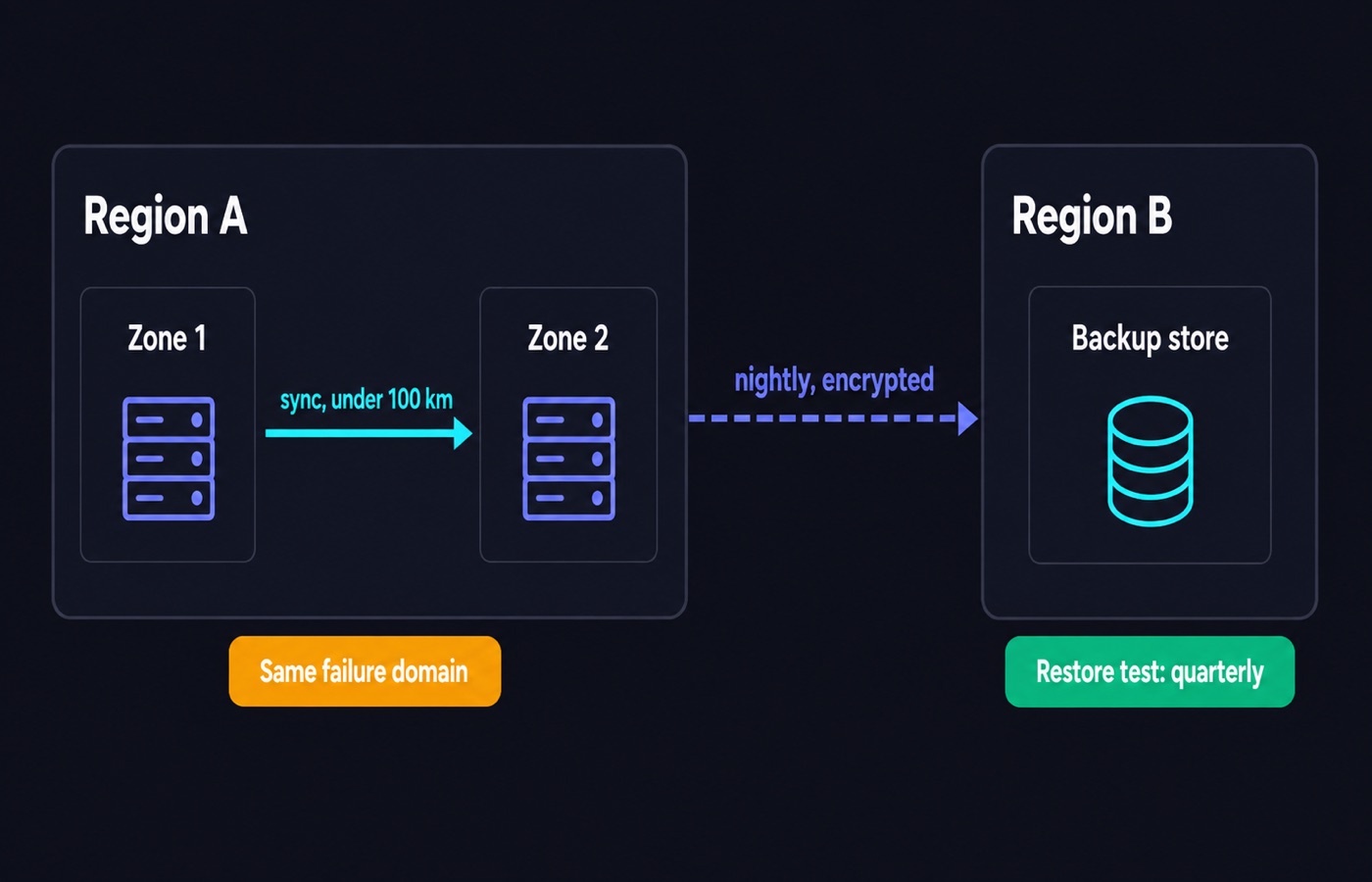
That 100 km figure is a useful mental model. Zone separation protects against a building-level failure: a generator, a switch, a fire. It does not protect against a regional event. Nor does it help with a bad route announcement across a whole metro area, or with a billing dispute that suspends your entire account. For those, keep your backups in a different region, ideally with a different provider and a different payment method.
A workable split for a small business looks like this. Production runs in one region. Nightly encrypted backups go to object storage in a second region, on another continent or at least in another country. You rehearse a restore every quarter. A backup you have never restored is only a hypothesis. Verifying the restore is the one thing that turns it into a plan.
Distance between production and backup does cost something. Replication over a 94 ms link cannot be synchronous without hurting write speed. Synchronous means every write waits until the copy has landed in both places. That is the trade-off. Synchronous replication wants a nearby zone, while durable disaster recovery wants a distant region. Most businesses need both, in that order of distance.
Test latency yourself before you pay
Provider marketing pages describe their network in adjectives. You can replace those with numbers in about five minutes, before any money changes hands.
Start with our ping test. It measures the round trip from your own browser to a set of hosts. Run it on the connection your users actually have, not on office fiber. Run it at your real peak hour, not at 6 a.m. Latency on a busy home link at 9 p.m. is the number that matters for a consumer product.
Then use the server ping tool against a specific IP address or hostname the provider gives you. Most hosts publish a looking glass or a test file for each facility. A looking glass is a public page that runs pings and traceroutes from inside their network. Ask support for one if you cannot find it. Compare candidate regions head to head, and write the figures down. Then you can tell a genuine difference from a one-off blip.
Two supporting checks are worth the time. Run a traceroute, which lists every hop on the path, and see whether traffic takes a sensible route or detours through another country. And if you plan several regions with private networking, check that your address plan does not collide across sites. Our subnet calculator is faster than doing the mask arithmetic by hand.
Finally, check the terms before you chase a number. A money-back window is your real test period. InMotion Hosting and Web Hosting Hub both publish 90-day refund windows, against the 30 days that is standard elsewhere. That gives you a full quarter of production traffic to judge a region on.
Choosing a region for a US audience
For a business selling to the United States, the choice usually comes down to three clusters. The Virginia and Ashburn corridor is the densest interconnection point on the East Coast. It is the default for an audience weighted east. Southern California and the Pacific Northwest serve the West Coast and give the shortest Pacific paths. Dallas and Chicago sit in the middle and split the difference, at roughly 28 ms to the East Coast.
The numbers that matter here are small. At 69 ms coast to coast, a user in Seattle hitting an East Coast origin loses under a tenth of a second per round trip. For a content site with a CDN in front, that is invisible. For a real-time application with chatty requests, it is not. Decide which of those you are building before you start optimizing.
Among providers we track, InMotion Hosting runs Los Angeles and Ashburn. That gives you a clean coast-to-coast pair inside one account. HostPapa publishes nine locations, including Los Angeles, Chicago, Dallas, Seattle, Atlanta, Buffalo and Miami. Vultr lists 33 regions, nine of them in the United States, from New Jersey and Atlanta to Silicon Valley and Honolulu. Browse the current set on our US VPS page.
Choosing a region for a global audience
A genuinely global audience is three or four audiences with different latency budgets. The usual pattern is one origin per populated continent. The other option is one origin plus a CDN, when most of what you serve can be cached.
Europe is the easiest second region. Frankfurt and Amsterdam are the two largest interconnection hubs. The published P50 between West Europe and Germany West Central is about 11 ms. So the choice between them comes down to price and peering, which is how networks hand traffic to each other. Our European VPS and German VPS pages list what our directory currently tracks there.
For Asia-Pacific, Singapore is the standard first stop. It has the best average latency to Southeast Asia, India and Australia at once. From a US East origin, the published figure to Southeast Asia is about 224 ms. That is why an APAC origin is not optional for interactive products. See our Singapore VPS page for tracked options.
Two providers in our directory have genuinely wide footprints. Vultr publishes 33 regions across the Americas, Europe, Asia-Pacific, the Middle East and Africa. Its Cloud Compute line starts at $5/mo for 1 vCPU and 1 GB of RAM, billed by the hour with no promotional pricing.
Hostinger publishes 13 data centers. The list covers Boston, Phoenix and Asheville in the United States, plus the United Kingdom, France, Germany, the Netherlands, Lithuania, Brazil, India, Indonesia, Malaysia and Singapore. Its KVM VPS starts at $6.49/mo on a 24-month term and renews at $11.99/mo. Prices checked Sep 17, 2026. Our ranking method is set out in the editorial policy.
What our catalog offers by region
Published location detail varies more than you would expect, and that is a quality signal in itself. The table below sums up what each provider we track actually states, as of September 2026.
| Provider | Published locations | Entry plan |
|---|---|---|
| Vultr | 33 regions, 9 in the US; Frankfurt, Amsterdam, London, Paris, Singapore, Tokyo, Sydney and more. | Cloud Compute 1 vCPU / 1 GB / 25 GB SSD, $5/mo hourly-billed. |
| Hostinger | 13 data centers: Boston, Phoenix, Asheville, UK, France, Germany, Netherlands, Lithuania, Brazil, India, Indonesia, Malaysia, Singapore. | KVM 1, 1 vCPU / 4 GB / 50 GB NVMe, $6.49/mo for 24 months, renews $11.99/mo. |
| HostPapa | 9 locations: Toronto, Los Angeles, Buffalo, Miami, Chicago, Dallas, Seattle, Atlanta, Amsterdam. | Unmanaged VPS Start, 2 vCPU / 2 GB / 50 GB NVMe, $5.95/mo for 36 months, renews $9.99/mo. |
| InMotion Hosting | 3 locations: Los Angeles, Ashburn, Amsterdam. | VPS 4 vCPU / 8 GB / 160 GB NVMe, $9.99/mo for 36 months, renews $16.99/mo. |
| Bluehost | 5 locations: Virginia, Arizona, London, Toronto, Amsterdam. | Self-Managed VPS NVMe 2, 1 vCPU / 2 GB / 50 GB, $2.09/mo for 24 months, renews $4.68/mo. |
| HostGator | “United States”, exact facilities not published. | Snappy 1000, 1 vCPU / 2 GB / 50 GB NVMe, $2.09/mo for 24 months, renews $4.68/mo. |
Prices and locations checked Sep 17, 2026. Look at the last two rows. A provider that will not name the city is a provider you cannot plan latency or residency around. If location matters to you at all, that vagueness is a reason to look elsewhere. Do you also run a public IP address that attracts attention? Then read our DDoS protection section before choosing a facility, because mitigation capacity is regional too.
Common mistakes
Choosing the region you live in rather than the one your customers live in. A founder in Berlin selling to Texas should host in Texas. Your own ping is the least important number in the decision.
Assuming a CDN makes origin location irrelevant. It does that for cacheable assets only. Every logged-in page and every API write still pays the full origin round trip.
Accepting “US data center” as an answer. That phrase covers a 4,000 km range and a 69 ms spread. Ask for the city, and treat a refusal as information.
Keeping backups in the same facility as production. Availability zones usually sit within 100 km of each other. That protects against a building failure, not a regional one.
Tuning 20 ms while ignoring a 1.5-second application. If your TTFB is poor, profile the application first. The network is rarely the largest part of the total.
Assuming server location settles your compliance position. The CCPA follows California residents’ data wherever it is stored. Adequacy rules turn on contracts and frameworks as much as on geography.
FAQ
How much latency does distance actually add? Roughly 10 ms of round trip per 1,000 km of fiber path, as a physical floor, and more in practice. Published Azure P50 figures put East US to West US at about 69 ms. East US to West Europe is about 83 ms, and East US to Southeast Asia is about 224 ms.
Does server location affect SEO? Not directly as a location signal. It does affect speed, though, and speed is measurable. Google’s guidance treats a TTFB of 0.8 seconds or less as good, and above 1.8 seconds as poor. A distant origin eats that budget before your code even runs.
Do I need an EU server to comply with the GDPR? Not necessarily. The European Commission maintains adequacy decisions for a list of countries. It includes the UK, Japan, Korea, Switzerland, Canada for commercial organizations, and the US for participants in the EU-US Data Privacy Framework. Outside that list, transfers need safeguards such as standard contractual clauses. Confirm your own position with a lawyer.
Is one region with a CDN enough for a global product? For a content site, usually yes. For an interactive application with frequent writes, no. Cache misses pay the full distance, and 224 ms per round trip is not something an edge network can hide.
How far apart should production and backups be? Far enough that one event cannot hit both. Availability zones inside a region usually sit within 100 km of each other, which covers building-level failures. For regional events, put the backup copy in a different region or country.
How do I test a host’s latency before buying? Ask for a test IP address or looking-glass address for the specific facility. Then measure it under your users’ network conditions, with our ping tools and a traceroute. Use the money-back window as a live trial: 30 days is standard, and some hosts publish 90.
Bottom line
Put the origin close to the majority of your revenue. Use a CDN for the static half of the problem. Keep a restorable copy far enough away that one incident cannot take both.
For a US audience, a single well-placed region plus a CDN is usually the whole answer. For a global product with dynamic pages, budget for a second and third origin, because 224 ms is not a number you can optimize away in code. Compare what is available by region in our VPS hosting section, then verify the numbers yourself with the server ping tool.
Sources
Sources
- learn.microsoft.com/en-us/azure/networking/azure-network-latency
- learn.microsoft.com/en-us/azure/reliability/availability-zones-overview
- commission.europa.eu/law/law-topic/data-protection/international-dimension-data-protection/adequacy-decisions_en
- ico.org.uk/for-organisations/uk-gdpr-guidance-and-resources/international-transfers
- priv.gc.ca/en/privacy-topics/privacy-laws-in-canada/the-personal-information-protection-and-electronic-documents-act-pipeda
- web.dev/articles/ttfb
Written and fact-checked by the WebHostingBreak Editorial Team in line with our editorial policy. Prices quoted here come from the provider reviews we maintain and carry the date they were last checked. Spotted an error? Tell us.