
Three domain types have confused cPanel users for years: parked domains, addon domains and subdomains. Two things have changed since the classic explanations were written. A parked domain is now called an alias. And the separate screen for each type is gone. Updated for 2026: in the Jupiter theme, the Addon Domains, Subdomains and Aliases interfaces were deprecated in cPanel & WHM version 100 and removed in version 108. All three are now created from a single Domains interface.
What each type actually is
Alias, formerly parked domain
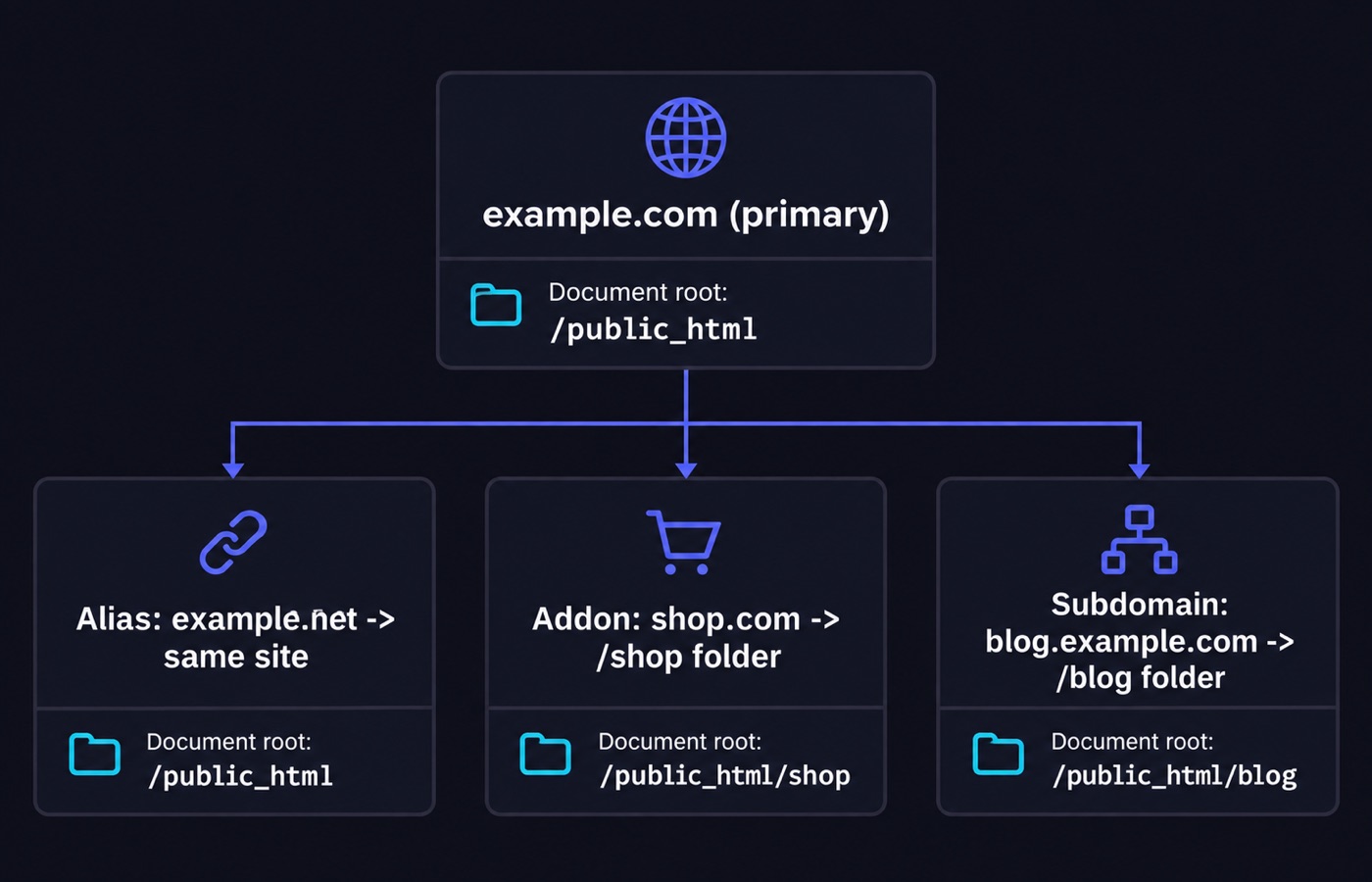
An alias is a second domain name that points at your main domain. Both names serve the same website, from the same folder on the server. Here is the classic example. A company owns example.com and example.net, and it wants the second name to show the same site instead of an error.
Addon domain
An addon domain is an extra, separate domain owned by the same cPanel account. It is stored in its own folder. This is how one hosting account runs several unrelated websites. You get separate content and separate files, with one login and one pool of account resources.
Subdomain
A subdomain is a section of a site that lives in a subfolder inside the account. You reach it at a name like shop.example.com or blog.example.com. Nothing new has to be registered. Subdomains are yours to create, because you already own the parent domain.
How the modern Domains interface decides which one you get
Open cPanel >> Home >> Domains >> Domains and click Create a New Domain. Choose a registered domain and type the name. What you do next with the document root decides the type. The document root is the folder on the server that holds the files for that domain.
- Leave “Share document root” selected. The new domain then serves the same content as the existing one. That is an alias. This setting is permanent for that domain.
- Clear the checkbox and give the domain its own folder. You get an addon domain with its own document root. The folder has to sit inside
public_html. A number of system folders are off-limits as document roots. - Enter a name with a dot in it, such as
shop.example.com. cPanel then creates a subdomain. It fills in the document root and subdomain fields for you, and the suggested values are usually the right ones.
The domain types you can use depend on the features your hosting provider has turned on for the account. Addon Domains, Aliases and Subdomains are three separate features in WHM’s Feature Manager. So a missing option is a plan limit, not a bug.
The DNS side
cPanel controls how the server answers for a domain. It does not control where the internet sends the request. That part is DNS, the system that turns a domain name into a server address. Two things have to be true before any of this works.
- The domain must be registered. You cannot register, update or renew a registration inside cPanel. That happens at your registrar.
- The domain’s authoritative nameservers must already point at the hosting account. The nameservers are the servers that hold the official answers for your domain. As an alternative, the hostname can resolve to the server’s IP address through A or AAAA records.
The records you can edit live in cPanel’s Zone Editor. A subdomain usually needs an A or AAAA record for the new hostname. An A record points a name at an IPv4 address, and an AAAA record points it at an IPv6 address. A CNAME record is the other option: it points the new name at the parent name.
Anything the Zone Editor does not show is managed somewhere else. That is usually the provider, or an external DNS host, and you have to ask them. DNS changes can take a day or more to reach every resolver around the world. So a new domain is not always visible the moment cPanel reports success.
Small details worth knowing
- When you create an addon domain or a subdomain, cPanel sets up PHP error logging for it on its own. The log file lands in the account’s
logsfolder. You can change that in the MultiPHP INI Editor. - Bandwidth for an alias is not counted separately. The main domain’s bandwidth figures include alias traffic. That matters when you read a usage report and wonder why a number looks high.
- Package limits control how many of each type you can create. WHM packages set Max Addon Domains, Max Parked Domains (aliases) and Max Sub Domains. So “unlimited domains” in a plan description is worth checking against the actual package.
SEO and redirect considerations
This is where aliases cause real damage if you are careless. An alias is not a redirect. It serves the same pages under a second name. Search engines can therefore find two full copies of your site, at two hostnames.
Say the second domain exists only to protect a brand or to catch typos. The cleaner approach is then a 301 redirect to your main domain. A 301 tells browsers and crawlers that the move is permanent, and it is set up in cPanel’s Redirects interface. Visitors and search engines all end up at one address. If you do want both names live, make sure every page carries a canonical link that points at the preferred hostname.
For content, the subdomain versus subfolder decision is about how separate the section really is. A help center, or a store running on different software, is a natural subdomain. A blog that exists to support the main site is usually easier to run as a subfolder of the main domain. It is also easier to keep consistent that way.
Finally, HTTPS. Every domain and subdomain on the account needs its own certificate coverage. The Force HTTPS Redirect toggle in the Domains list sends visitors from the insecure version to the secure one. cPanel only lets you turn that on for a main domain with a valid certificate, and the toggle does not appear for aliases.
Hosting tip
Do you plan to run several sites from one account? Check the addon domain and subdomain limits in the plan before you buy, not after the second project starts. Our web hosting comparison lists what each provider actually includes. The hosting directory is a faster way to look up one specific company’s plans.
Quick decision guide
- Same site, second name: an alias, or better, a 301 redirect to your main domain.
- Different site, same account: an addon domain with its own document root.
- Section of an existing site: a subdomain, or a subfolder if the content belongs with the main site.
Interface names move between cPanel versions, and providers can hide features entirely. So if your panel does not match the wording here, check your version and the current cPanel documentation before you assume something is broken.
Sources
- docs.cpanel.net/cpanel/domains/domains
- docs.cpanel.net/cpanel/domains/domains/create-a-new-domain
- docs.cpanel.net/knowledge-base/cpanel-product/cpanel-deprecation-plan
- docs.cpanel.net/whm/packages/add-a-package
Written and fact-checked by the WebHostingBreak Editorial Team in line with our editorial policy. Prices quoted here come from the provider reviews we maintain and carry the date they were last checked. Spotted an error? Tell us.