
Updated for 2026. Joomla is fast enough on modest hosting when it is set up properly. It is painfully slow when it is not. This guide covers what genuinely helps a Joomla 5 site on shared hosting or a small VPS, in the order worth doing it. It is also honest about the point where tuning stops helping and the hosting itself is the problem.
Start with the platform: PHP and database versions
The biggest free win is usually the PHP version. Joomla 5.x recommends PHP 8.3 and supports 8.1 as the minimum. For databases it wants MySQL 8.0.13 or later, or MariaDB 10.4 or later. The project also recommends a PHP memory limit of at least 256 MB. Add mod_rewrite if you use search engine friendly URLs on Apache.
Joomla 6 is out and raises the floor again. PHP 8.3 is the minimum there, and 8.4 is recommended. Even if you are not upgrading today, pick a host and a PHP version with that in mind. Then the upgrade stays a routine job instead of a migration.
On cPanel-style hosting you switch PHP per domain in MultiPHP Manager. After switching, load the site logged out and logged in, and read the Joomla system messages. An old extension can break on a newer PHP, and you want to find that now rather than a week later.
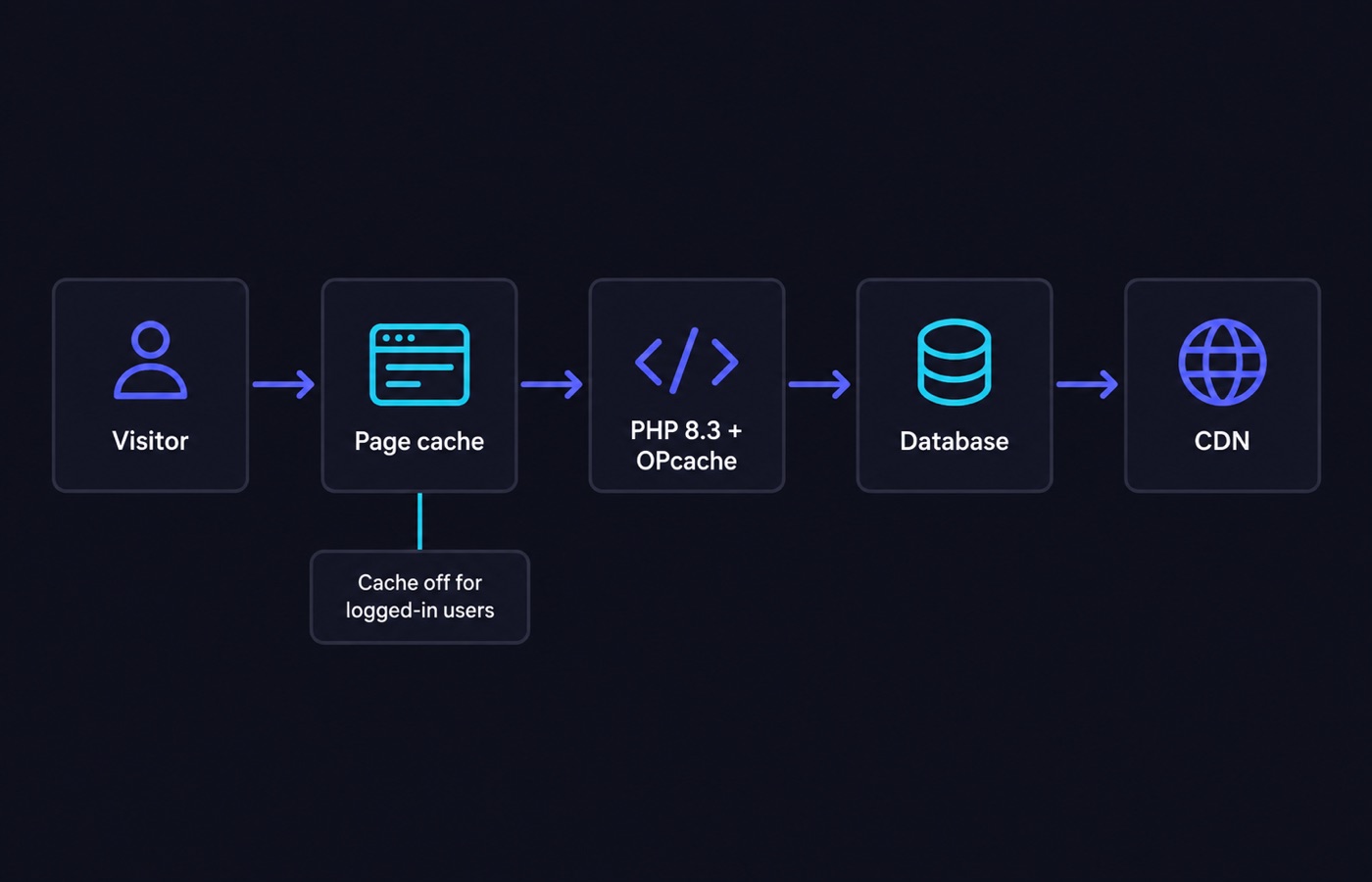
Make sure OPcache is enabled for the PHP version you selected. OPcache stores compiled PHP code in memory, so the server does not recompile the same files on every request. It is the cheapest performance gain available. Most managed hosts turn it on by default; on a VPS you may have to enable it yourself.
Joomla caching: three mechanisms, one decision
Joomla offers three caching options. It helps to know exactly what each one does.
Page cache plugin
Enable the System – Page Cache plugin and Joomla writes the full HTML of a page to a file in the cache folder. The next request for the same URL is served from that file. Joomla does not rebuild the page from components and modules. This is the fastest of the three options, and the bluntest.
Two things are worth remembering. The cached page is served until the Cache Time value in Global Configuration expires. And updating an article does not clear the page cache automatically. If you publish often, either shorten Cache Time or clear the cache after editing. The plugin also has parameters that exclude specific menu items and URLs. Use them for anything dynamic, such as a contact form, a search results page or a cart.
Progressive and conservative caching
Both are set in Global Configuration > System > System Cache. Conservative caching stores component and module output more cautiously. Progressive caching is more aggressive about reusing module output across pages. Both work at a finer grain than the page cache, so they suit sites with dynamic elements better. The trade-off is a smaller speed gain.
One rule applies to all three: Joomla does not cache for logged-in users. If your site is mostly a membership area, caching will barely register in your numbers. The work then belongs in queries, extensions and hosting instead. The cache location is set by the Path to Cache Folder parameter. That matters when your host caps the number of files or the disk space on the account.
Storage backend
File-based cache storage is the default and works everywhere. Memcached and Redis keep the cache in memory instead. If your host provides one of them, switching the cache handler to it removes a lot of small file operations. The gain is biggest on busy sites and on shared hosting with slow disks. Only choose a backend the host actually runs, because a misconfigured handler fails in ways that look like random site errors.
Compression, assets and images
- Turn on Gzip Page Compression in Global Configuration > Server. It is one checkbox, and it cuts HTML transfer size a lot. If your server already compresses at the web server level, do not double up. Check the response headers first.
- Resize images before upload. A 4000-pixel-wide photo scaled down in CSS still downloads in full. Export at the size the template actually displays. Use modern formats such as WebP or AVIF where your template and audience allow it.
- Use lazy loading for images below the fold. The browser then loads them only when the visitor scrolls down, so the first screen is not competing with the rest of the page.
- Audit the template and extensions. Every module renders, and every plugin runs on every page. A template that loads several font families and three icon sets will never feel quick. Unpublish what you do not use. Turn on the template’s asset minification and combination features if it has them.
Database hygiene
Joomla databases put on weight quietly. This list is worth running through every few months.
- Clear expired sessions. Trim the action log and user log tables, which grow without limit on busy sites.
- Empty the trash for articles, modules and menu items. Uninstall extensions you stopped using instead of only disabling them.
- On a VPS, enable the slow query log for a day and look at what appears. The log lists database queries that took too long. One badly indexed third-party query is a common cause of a site that is fast on the home page and slow on one view.
In front of the site: HTTP caching and a CDN
Serve static assets with long cache lifetimes and a versioned filename. Browsers then stop re-requesting them. A CDN is a network of servers that keeps copies of your images, CSS and JavaScript close to visitors. It also absorbs traffic spikes. If your audience is spread across several countries, a CDN usually beats any further server tuning. Keep HTTPS on everywhere, and keep your SEF URL setup consistent, so you are not paying for redirects on every page view.
Measure, do not guess
Change one thing at a time and re-measure. Use your browser’s network panel with the cache disabled. It shows real transfer sizes and where the time goes. Compare a logged-out page against a logged-in one, so you know how much of your speed comes from caching. Record a baseline before you start, because otherwise you will not know which change helped.
Hosting tip
Caching hides a slow host; it does not fix one. Say the site is quick on a warm cache and slow whenever the cache is cold. Then the bottleneck is CPU, disk speed or the entry-process limits on your plan. Entry processes are the number of PHP requests your account may run at the same time. No amount of Joomla configuration will change those limits.
That is the point to compare plans honestly. A better shared hosting plan with faster storage may be enough. A small VPS with dedicated CPU and your own PHP and cache backends is the usual next step for a growing Joomla site.
Sources
- manual.joomla.org/docs/5.4/get-started/technical-requirements
- manual.joomla.org/docs/get-started/technical-requirements
- manual.joomla.org/docs/general-concepts/cache/caching-views-modules
Written and fact-checked by the WebHostingBreak Editorial Team in line with our editorial policy. Prices quoted here come from the provider reviews we maintain and carry the date they were last checked. Spotted an error? Tell us.